• Debian 11 is approaching its end-of-life (vendor EOL date - August 31, 2026). Plesk Obsidian 18.0.80 will be the last release to support it.
    If you are running Plesk Obsidian on Debian 11, we recommend you upgrade those servers to Debian 12 using our dist-upgrade tool.
  • We plan to deprecate and remove the support for XML RPC protocol versions earlier than 1.6.9.1 in Plesk Obsidian 18.0.82. We strongly recommend that you update all existing integrations using earlier versions of the XML RPC protocol to comply with the version 1.6.9.1 specification.

help diagnosing high apache cpu/memory

mettle

New Pleskian
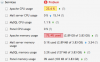
Hi can someone help me with diagnosing high cpu and memory usage by apache? It seems to be getting higher and higher. I can restart apache and its fine for a while but then spikes again. Thanks.

Screen Shot 2013-05-29 at 10.45.20 AM.png
 
Hello,

You will have to monitor your server with " top -d 2c" command and check which files is consuming the memory and CPU on your server

Thanks
 
Ok, what next? I see mostly httpd threads and apache as the user. How do I track down which sites/files are using the most resources? Would switching sites to use fastcgi help?
 
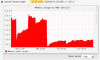
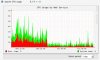
I switched my highest traffic site to fastcgi and this is the result. Yesterday at 11am I restarted apache, that was the sudden change. Then last night at around 2030 I restarted it again after changing the site to fastcgi. Seems to have made a difference, how do I know if this amount of memory usage is good or bad?

Screen Shot 2013-05-30 at 9.25.18 AM.png
Screen Shot 2013-05-30 at 9.25.12 AM.png
 
Where did you get those graphs? I've found my apache processes at 1.4 gig, and when apache is running memory usage goes from 1.9 gig to 8 gig (100% of memory).
I've severely reduced StartServers, MinSpareServers and MaxSpareServers but just 10 processes still consumes all my memory.

updated: found the graphs. Needed to install PHM (plesk health monitor).

But now see in health monitor that Real Memory Usage is pegged at 100% and Apache constantly growing using close to all the memory.
 
Last edited:
Back
Top