
 Facebook
 Twitter
- Server operating system version
- CentOS Linux 7.9.2009 (Core)
- Plesk version and microupdate number
- Plesk Obsidian Version 18.0.52 Update #3
Hi,
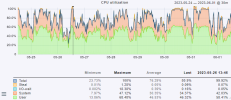
we have a plesk instance with about 80 or 100 websites on it. Although high cpu usage websites are fast responsive, server is not "overloaded". Today I upgraded from 6 to 8 cores and could also put more cores into it. But it would be nice to know which website causes how much load or cpu usage. Thinking about introducing cgroups but I would like to have some stats before.
Cheers
Martin
we have a plesk instance with about 80 or 100 websites on it. Although high cpu usage websites are fast responsive, server is not "overloaded". Today I upgraded from 6 to 8 cores and could also put more cores into it. But it would be nice to know which website causes how much load or cpu usage. Thinking about introducing cgroups but I would like to have some stats before.
Cheers
Martin



