
 Facebook
 Twitter
Plesk Obsidian 18.0.76#2
Look at the Plesk Admin GUI Home page, it's full of abstract (usually numerical) information but with NO WAY OF GOING DEEPER!
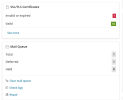
See here it tells me I have 1 invalid or expired domain; but no way of clicking through to see what this domain is. --
See it tells me we have 1 mail in the queue that's not being delivered, but no way of seeing what that mail is -- although bizarrely it goes give a shortcut to clear the queue which is a wyrd idea if we can't see what we're clearing!
To check the SSL I have to go to "See More" and then click through multiple listings to find the one that's the issue. Why can't the notification link me to a listing of JUST the issue domains?
Same with the Mail Queue, to view the mail queue I currently need to go to "Tools & Settings", then to "Mail Queue" then need to scroll past the "active" mails to find the Deferred ones. Why not simply make the numbers or the deferred listed in their own list from the front page notification.
It seems the people who build Plesk don't actually use it.
Look at the Plesk Admin GUI Home page, it's full of abstract (usually numerical) information but with NO WAY OF GOING DEEPER!
See here it tells me I have 1 invalid or expired domain; but no way of clicking through to see what this domain is. --
See it tells me we have 1 mail in the queue that's not being delivered, but no way of seeing what that mail is -- although bizarrely it goes give a shortcut to clear the queue which is a wyrd idea if we can't see what we're clearing!
To check the SSL I have to go to "See More" and then click through multiple listings to find the one that's the issue. Why can't the notification link me to a listing of JUST the issue domains?
Same with the Mail Queue, to view the mail queue I currently need to go to "Tools & Settings", then to "Mail Queue" then need to scroll past the "active" mails to find the Deferred ones. Why not simply make the numbers or the deferred listed in their own list from the front page notification.
It seems the people who build Plesk don't actually use it.
