Facebook
 Twitter
Hi guys,
My domain aws.rogerioit.com is pointing to Plesk control panel and it is working fine with Lets Encrypt.
My hostname is: aws.rogerioit.com
I can access plesk at
https://aws.rogerioit.com:8443
So I tried to create a domain with the same name like hostname aws.rogerioit.com
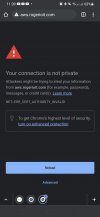
The domain above was created successfully but when I try to access it I got certificate error message in the browser
My question is: can I use aws.rogerioit.com:8443 to access plesk and aws.rogerioit.com to my website?
Help me please
My domain aws.rogerioit.com is pointing to Plesk control panel and it is working fine with Lets Encrypt.
My hostname is: aws.rogerioit.com
I can access plesk at
https://aws.rogerioit.com:8443
So I tried to create a domain with the same name like hostname aws.rogerioit.com
The domain above was created successfully but when I try to access it I got certificate error message in the browser
My question is: can I use aws.rogerioit.com:8443 to access plesk and aws.rogerioit.com to my website?
Help me please