• The new Python extension is now available. It allows customers to deploy and manage WSGI-based Python applications on their websites directly from Plesk.
  • The Plesk Mobile apps for iOS and Android and the Plesk Mobile Center extension have been deprecated, and are no longer available for new installations. In Plesk Obsidian 18.0.84, the Plesk Mobile Center extension will be removed from servers during the upgrade, and the Plesk Mobile apps will lose their server management features.
  • The Social Login extension has been deprecated and will be removed in Plesk Obsidian 18.0.84. After that, it will no longer be possible to log in to Plesk with a Google, Facebook, GitHub account, or with a passkey. Plesk usernames and passwords, as well as logging in with a WebPros Account, are not affected.

Issue Recource Manager (Cgroups) does not show disk IO options

vissgouvinas

New Pleskian
Server operating system version
Ubuntu 24.04
Plesk version and microupdate number
18.0.76
I have activated the Cgroups option on my Plesk installation and while i have options to limit both CPU and RAM it does not show the Disk IO at all.
I have already checked on that iotop works on the server as well.

Do you have any ideas?
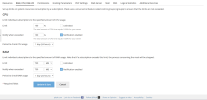
 

Attachments

  • Screenshot 2026-03-09 025107.png
    Screenshot 2026-03-09 025107.png
    145 KB · Views: 6
Can you provide more details on the hardware and configuration?
Is it installed on a RAID partition? Is it a physical server or a VM? If a VM what is being used for virtualization?

Can you also run:
Code:
plesk sbin resctrl --features
 
The server is an raid 5 configuration, and it is a physical server, not a VM.

I runned and I got:
{"cpu": true, "cpuacct": true, "memory": true, "blkio": true, "vhosts_blkio": false}
 
That does explain it then, Plesk Resource controller doesn't support IO limiting on RAID partitions.
And the option is not shown as Plesk detects that "vhosts_blkio": false
 
Back
Top