Facebook
 Twitter

Passkey Login for Plesk
Passwordless sign-in with passkeys (WebAuthn / FIDO2) for Plesk Obsidian. A German version of this file is available as README.de.md.Status
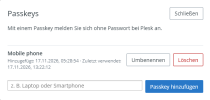
Tested on Plesk Obsidian 18.0.82 (Debian 13, PHP 8.4):- Saving the settings, registering a passkey in "My Profile" as an administrator.
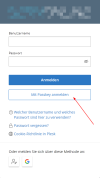
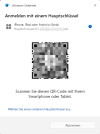
- Signing in with a passkey using a phone (QR code / cross-device flow).
- Installing an update over an existing installation (same version, higher release).
Requirements
- Plesk Obsidian 18.0.66 or later (declared minimum; tested on 18.0.82)
- HTTPS and a browser or device with passkey support (current versions of Chrome, Edge, Firefox and Safari, Windows Hello, Android and iOS 16 or later)
Installation
- Upload the ZIP in the Plesk panel (Extensions), or run plesk bin extension --install passkey-login-<version>.zip.
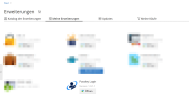
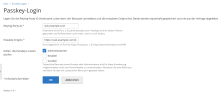
- Open Extensions > Passkey Login and save the relying party ID (host name without port) and the allowed origins (for example https://panel.example.com:8443). Until this is done, the extension stays invisible.
- Choose which roles may use passkeys. Default: administrators only. Enable resellers and customers only after you have tested this with additional users: the Plesk SDK cannot tell an additional user from the account owner.
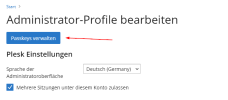
- Register passkeys under My Profile > Manage passkeys.
How it works and security notes
- The relying party ID and the origins are set by the administrator and are never derived from the Host header. Origins are compared strictly, both in the request and in clientDataJSON.
- Challenges are random, valid for 330 seconds, bound to their purpose (and owner when registering) and can be used only once.
- User verification and user presence are mandatory. Only the attestation format "none" is accepted. The signature counter is checked.
- Passkeys are assigned to the Plesk client ID, not to the login name. If an account is deleted, its passkeys are removed, and sign-in is refused when the account no longer exists.
- After a successful verification the extension creates a Plesk session with create_session and redirects to rsession_init.php. It does not switch off Plesk MFA. According to the Plesk documentation, Plesk still asks for the MFA code after a token sign-in; this has not been confirmed on a real system yet.
- Failed attempts are rate limited per IP address (IPv6 per /64 network).
Known issues
- Android can show "An error occurred" on the phone after a successful cross-device (QR code) sign-in. The same message appears on webauthn.io, so it is not caused by this extension, and the sign-in itself succeeds.
- Passkeys of Plesk's Social Login extension are not imported. Register new passkeys instead.
Data
The database is stored in <PLESK_ROOT>/var/modules/passkey-login/passkeys.sqlite (typically /usr/local/psa/var/...; the exact path comes from pm_Context::getVarDir()). Updates keep it. Back it up before you uninstall the extension, because it is not confirmed whether Plesk removes the directory on uninstall.Languages
The interface is available in 15 languages. English and German were written by hand; the other languages are machine-translated, and reviews by native speakers are welcome.License
MIT, see LICENSE. Bundled third-party software (lbuchs/WebAuthn, MIT): see library/vendor/WebAuthn/NOTICE.txt and library/vendor/WebAuthn/LICENSE-lbuchs-WebAuthn.txt.Regards
Tessa