• Debian 11 is approaching its end-of-life (vendor EOL date - August 31, 2026). Plesk Obsidian 18.0.80 will be the last release to support it.
    If you are running Plesk Obsidian on Debian 11, we recommend you upgrade those servers to Debian 12 using our dist-upgrade tool.
  • We plan to deprecate and remove the support for XML RPC protocol versions earlier than 1.6.9.1 in Plesk Obsidian 18.0.82. We strongly recommend that you update all existing integrations using earlier versions of the XML RPC protocol to comply with the version 1.6.9.1 specification.

Resolved 500 PleskExt\SslIt\OpenSsl\OpenSslException

sub205

New Pleskian
Server operating system version
Debian 10.13
Plesk version and microupdate number
Plesk Obsidian 18.0.71 Update #2
Hello,

out of nowhere, when accessing the SSL options on a new vhost, this error appears:

Right now we are unable to configure SSL and/or add certificates to our installation.

Repair kit didn't help and the plugins are on current versions as statet in other posts.

How to debug/fix this?

Kind regards
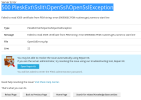
1757484548684.png
 
Hello, @sub205 . Could you please navigate to Subscription > example.com > Hosting Settings and confirm if there's a certificate selected under Certificate within the SSL/TLS support section? If there is, please set it to "Not selected" and try accessing the SSL page again.
 
Thank you for the info. After some trial and error, it worked.
I still don't understand why it initially stopped working by default and we now have to use this workaround.
But maybe it gets better when i update the base system next week.
 
If there are a certificate assigned it was likely non-existent or corrupted. If there wasn't, I am also unsure what caused the issue.
 
Back
Top