
 Facebook
 Twitter
- Server operating system version
- AlmaLinux 8.9
- Plesk version and microupdate number
- Plesk Obsidian Web Pro Edition 18.0.60 Update #1
Hi,
As the title says when I try to use some directive in my vhost this one doesn't work, unlike when I write it in the main file.
main file would be... /var/www/vhosts/system/domain/conf/httpd.conf
vhost files would be... /var/www/vhosts/system/domain/conf/vhost_ssl.conf and vhost.conf (I use ssl though)
I noticed that main file has no "include" for those files, I don't know if this could be the problem.
When I intentionally mistype a directive I can't pass the
Also, the vhost files are in the proper path because Plesk shows me the directive on the webpage
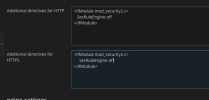
So, what is wrong here?
Thanks in advance
As the title says when I try to use some directive in my vhost this one doesn't work, unlike when I write it in the main file.
main file would be... /var/www/vhosts/system/domain/conf/httpd.conf
vhost files would be... /var/www/vhosts/system/domain/conf/vhost_ssl.conf and vhost.conf (I use ssl though)
I noticed that main file has no "include" for those files, I don't know if this could be the problem.
When I intentionally mistype a directive I can't pass the
sudo apachectl configtest, the total opposite than in the vhost, where I can write whatever I want and pass this command without problem.Also, the vhost files are in the proper path because Plesk shows me the directive on the webpage
So, what is wrong here?
Thanks in advance


