
 Facebook
 Twitter
Liam Connelly
New Pleskian
Hi Everyone
Were having an issue with the additional apache/nginx directives not being applied, it doesn't seem to matter what we put in here it just doesn't seem to replicate onto the site itself
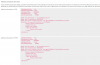

if we enter this and apply, no errors are shown but it just doesnt apply the changes to the site does anyone have any idea's how we can proceed here? We've used this functionality on other Plesk servers (although not with the same directives)
Regards
Liam
Were having an issue with the additional apache/nginx directives not being applied, it doesn't seem to matter what we put in here it just doesn't seem to replicate onto the site itself
if we enter this and apply, no errors are shown but it just doesnt apply the changes to the site does anyone have any idea's how we can proceed here? We've used this functionality on other Plesk servers (although not with the same directives)
Regards
Liam

