• The new Python extension is now available. It allows customers to deploy and manage WSGI-based Python applications on their websites directly from Plesk.
  • The Plesk Mobile apps for iOS and Android and the Plesk Mobile Center extension have been deprecated, and are no longer available for new installations. In Plesk Obsidian 18.0.84, the Plesk Mobile Center extension will be removed from servers during the upgrade, and the Plesk Mobile apps will lose their server management features.
  • The Social Login extension has been deprecated and will be removed in Plesk Obsidian 18.0.84. After that, it will no longer be possible to log in to Plesk with a Google, Facebook, GitHub account, or with a passkey. Plesk usernames and passwords, as well as logging in with a WebPros Account, are not affected.

Question Apache websocke proxyPass failed

hechmi2chelbi

New Pleskian
Bonjour je fais la configuration d'un proxyPass websocket et apache 2 sur Plesk, la configuration ça-marche bien, puis il tombe banne à cause d'une mise à jour auto de Plesk, je pense lie à la version d'apache, car le Plesk il fait la mise à jour d'apache vers 2.4.4
quelqu'un m'aide de ressoudé ce problème svp, pour récupérer la bonne version d'apache ou faire une restauration de Plesk

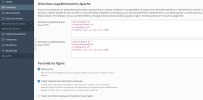
Directives supplémentaires pour HTTP :
SSLProxyEngine On
ProxyPreserveHost On
ProxyRequests Off
ProxyPass /wss/ ws://127.0.0.1:3000/

Directives supplémentaires pour HTTPS :
SSLProxyEngine On
ProxyPreserveHost On
ProxyRequests Off
ProxyPass /wss/ ws://127.0.0.1:3000/
 

Attachments

  • Screenshot_2.jpg
    Screenshot_2.jpg
    125.2 KB · Views: 5
Please use the default language of this forum - English.
Thanks.
 
Hello, I am configuring a proxyPass websocket and apache 2 on Plesk, the configuration works well, then it fails because of an auto update of Plesk, I think it is linked to the version of apache, because the Plesk it does the apache update to 2.4.4
someone help me solve this problem please, to get the right version of apache or restore Plesk

Directives supplémentaires pour HTTP :
SSLProxyEngine On
ProxyPreserveHost On
ProxyRequests Off
ProxyPass /wss/ ws://127.0.0.1:3000/

Directives supplémentaires pour HTTPS :
SSLProxyEngine On
ProxyPreserveHost On
ProxyRequests Off
ProxyPass /wss/ ws://127.0.0.1:3000/
 
Back
Top