• The APS Catalog has been deprecated and removed from all Plesk Obsidian versions.
    Applications already installed from the APS Catalog will continue working. However, Plesk will no longer provide support for APS applications.
  • Please be aware: with the Plesk Obsidian 18.0.78 release, the support for the ngx_pagespeed.so module will be deprecated and removed from the sw-nginx package.

Question change log rotation settings in Plesk for all domains at once

tanasis

Regular Pleskian
Server operating system version
AlmaLinux 8.6 (Sky Tiger)
Plesk version and microupdate number
18.0.46 Update #1
Hello all,
according to https://support.plesk.com/hc/en-us/articles/214027349- with the command
plesk bin domain -l| while read dom_name; do plesk bin domain -u $dom_name -log-bytime weekly; done
i can change log rotation settings in Plesk for all domains at once.
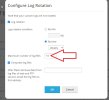
How can i set Maximum number of log files to 1 via the above command ?
 

Attachments

  • image2120.jpg
    image2120.jpg
    58 KB · Views: 5
Use the -log-max-num-files command. Like:

Bash:
# plesk bin domain -l| while read dom_name; do plesk bin domain -u $dom_name -log-max-num-files 1; done

(I haven't tested this, use at your own discretion).
 
Last edited:
Use the -log-max-num-files command. Like:

Bash:
# plesk bin domain -l| while read dom_name; do plesk bin domain -u $dom_name -log-max-num 1; done

(I haven't tested this, use at your own discretion).
Unrecognized option: 'log-max-num'
 
Back
Top