Facebook
 Twitter
- Server operating system version
- AlmaLinux 8.10
- Plesk version and microupdate number
- Version 18.0.61 Update #5
Hello,
on my webserver I had high traffic websites with PHP as "Dedicated FPM application served by Apache / nginx" and I had high CPU.
I changed 4 of them to "FPM application served by Apache / nginx" (no Dedicated) and then some sites start showing Error 503.
I think to change the PHP-FPM settings globally, I'll have to increase the values.
Where can I find the globally settings in Plesk?
on my webserver I had high traffic websites with PHP as "Dedicated FPM application served by Apache / nginx" and I had high CPU.
I changed 4 of them to "FPM application served by Apache / nginx" (no Dedicated) and then some sites start showing Error 503.
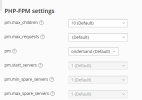
I think to change the PHP-FPM settings globally, I'll have to increase the values.
Where can I find the globally settings in Plesk?