• The new Python extension is now available. It allows customers to deploy and manage WSGI-based Python applications on their websites directly from Plesk.
  • The Plesk Mobile apps for iOS and Android and the Plesk Mobile Center extension have been deprecated, and are no longer available for new installations. In Plesk Obsidian 18.0.84, the Plesk Mobile Center extension will be removed from servers during the upgrade, and the Plesk Mobile apps will lose their server management features.
  • The Social Login extension has been deprecated and will be removed in Plesk Obsidian 18.0.84. After that, it will no longer be possible to log in to Plesk with a Google, Facebook, GitHub account, or with a passkey. Plesk usernames and passwords, as well as logging in with a WebPros Account, are not affected.

Resolved GraphQL Error Mass E-Mail

pcds

New Pleskian
Server operating system version
Debian 10.13
Plesk version and microupdate number
18.0.70
Good Day
I'm logged in in the web interface as administrator. In Mass Email Messages when i click "Create template" or "Send Mass Email" i get the error :

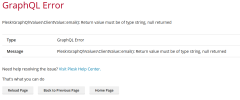
GraphQL Error
Plesk\GraphQl\Values\ClientValue::email(): Return value must be of type string, null returned

How can I fix this?

Kind regards
 

Attachments

  • Screenshot 2025-07-03 110408.png
    Screenshot 2025-07-03 110408.png
    56.6 KB · Views: 3
Hello, @pcds . You likely have a user (customer/reseller) on the server missing an email address (which is required detail) in the Contact Information. Please execute the follow commands on the server:

plesk db
select id, cname, pname, login, email from clients where email is NULL\G

That should return the users who are missing the value, which you can then define in Customers/Resellers > user_name > Editing Contact Info > Email address field.
 
Hello, @pcds . You likely have a user (customer/reseller) on the server missing an email address (which is required detail) in the Contact Information. Please execute the follow commands on the server:


That should return the users who are missing the value, which you can then define in Customers/Resellers > user_name > Editing Contact Info > Email address field.
Thank you very much. This was the case. Now it works.
 
Back
Top