Facebook
 Twitter
Hi all,
I am struggling to get the Elasticsearch Docker running.
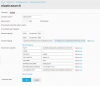
I have created an elasticsearch docker from withing plesk panel. I have setup like attached screenshot. The elasticsearch.yml looks like below:
http:
port: 9200
path:
data: /bitnami/elasticsearch/data
transport:
tcp:
port: 9300
network:
host: localhost
publish_host: 172.17.0.2
bind_host: 0.0.0.0
node:
name: 0560f7727ad2
master: true
data: true
ingest: false
discovery:
type: single-node
The container starts properly but when I go to my sites URL I get this.
I use nginx proxy I think somehow I must be doing something wrong with ports. Can anybody help me get on the way with this?
Thanks
I am struggling to get the Elasticsearch Docker running.
I have created an elasticsearch docker from withing plesk panel. I have setup like attached screenshot. The elasticsearch.yml looks like below:
http:
port: 9200
path:
data: /bitnami/elasticsearch/data
transport:
tcp:
port: 9300
network:
host: localhost
publish_host: 172.17.0.2
bind_host: 0.0.0.0
node:
name: 0560f7727ad2
master: true
data: true
ingest: false
discovery:
type: single-node
The container starts properly but when I go to my sites URL I get this.
| name | "0560f7727ad2" |
| cluster_name | "elasticsearch" |
| cluster_uuid | "Jbo7dI8FQKucbJbV6eJC2w" |
| version | |
| number | "7.8.1" |
| build_flavor | "oss" |
| build_type | "tar" |
| build_hash | "b5ca9c58fb664ca8bf9e4057fc229b3396bf3a89" |
| build_date | "2020-07-21T16:40:44.668009Z" |
| build_snapshot | false |
| lucene_version | "8.5.1" |
| minimum_wire_compatibility_version | "6.8.0" |
| minimum_index_compatibility_version | "6.0.0-beta1" |
| tagline | "You Know, for Search" |
I use nginx proxy I think somehow I must be doing something wrong with ports. Can anybody help me get on the way with this?
Thanks