• Debian 11 has reached its end-of-life (vendor EOL date - August 31, 2026). Plesk Obsidian 18.0.81 is the last release to support it.
    If you are running Plesk Obsidian on Debian 11, we recommend you upgrade those servers to Debian 12 using our dist-upgrade tool.
  • We plan to deprecate and remove the support for XML RPC protocol versions earlier than 1.6.9.1 in Plesk Obsidian 18.0.82. We strongly recommend that you update all existing integrations using earlier versions of the XML RPC protocol to comply with the version 1.6.9.1 specification.

How to get app vault items

Amin Taheri

Golden Pleskian
Plesk Certified Professional
Hi guys,

I just installed Plesk 12.0.18 and I am trying to get application vault items, but I dont see any way to chose which ones are able to be installed (the server has none - including no wordpress).

How do I get the list of apps that I can install like was present in the older versions?
 
Hi Amin Taheri,

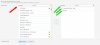
first, please make sure, that the Application Vault is visible: Home > Tools & Settings > Custom View Settings

Second, please make sure, that either the restricted access over your subscription settings is not set ( "Provide only applications that I select" at "Home > Service Plans > Hosting Plans > YOUR_SERVICE_PLAN" ) and IF you choose to limit the applications with restriction in your service plan, then please make sure, that you choosed available applications for your subscriptions:

Service_Plan_Applications_custom_001.jpg
 
Last edited by a moderator:
Thank you much for the reply - in your screen shot you have a list of applications to select. My list is empty - how do I get that list to populate?
 
Hi Amin Taheri,

you can try to clear the cache ( "Home > Tools & Settings > Application Vault > Clear cache" ) , so that Plesk reloads the available applications. If you experience issues here, please have a look at the Plesk Control Panel log - files for investigations.
 
Back
Top