
 Facebook
 Twitter
hschneider
New Pleskian
This article describes how to add a Fail2Ban Jail for PostgreSQL:

Here the short version in english:
Create the filter file in
/etc/fail2ban/filter.d/custom-postgres.conf
with this content:
[Definition]
failregex = ^<HOST>.+FATAL: password authentication failed for user.+$
^<HOST>.+FATAL: no pg_hba.conf entry for host .+$
ignoreregex = duration:#
ignoreregex =
Save and restart Fail2Ban.
Add the Host ID to the Postgres Log by editing this file:
/etc/postgresql/10/main/postgresql.conf
Change log_line_prefix to
log_line_prefix = '%h %m [%p] %q%u@%d '
Save and restart Postgres.
Now go to Plesk's Fail2Ban Setup and create a new jail with this action:
iptables[chain="INPUT", name="PostgreSQL-Server", port="5432", protocol="tcp", returntype="RETURN", lockingopt="-w"]
Full config here:
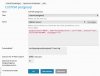
That'S it
-- Harald
Plesk: Anleitung zum Absichern von PostgreSQL per Fail2Ban | marketmix.com
Wenn man unter Plesk den Standard-Port von PostgreSQL freigibt, sollte man neben einem komplexen Passwort eine zusätzliche Absicherung per Fail2Ban einbauen.
marketmix.com
Here the short version in english:
Create the filter file in
/etc/fail2ban/filter.d/custom-postgres.conf
with this content:
[Definition]
failregex = ^<HOST>.+FATAL: password authentication failed for user.+$
^<HOST>.+FATAL: no pg_hba.conf entry for host .+$
ignoreregex = duration:#
ignoreregex =
Save and restart Fail2Ban.
Add the Host ID to the Postgres Log by editing this file:
/etc/postgresql/10/main/postgresql.conf
Change log_line_prefix to
log_line_prefix = '%h %m [%p] %q%u@%d '
Save and restart Postgres.
Now go to Plesk's Fail2Ban Setup and create a new jail with this action:
iptables[chain="INPUT", name="PostgreSQL-Server", port="5432", protocol="tcp", returntype="RETURN", lockingopt="-w"]
Full config here:
That'S it
-- Harald
Last edited:

