
 Facebook
 Twitter
I am quite new to server configurations and have a pretty basic question, I think.
I just ordered a virtual server at IONOS for creating a special web project. For this project it is necessary to install Wordpress on this server, but it is not possible to transfer the Domain to IONOS. This means I have to install Wordpress without having a Domain saved in Plesk Obsidian, so I am not able to use the Wordpress Tools in Plesk.
For this reason I have to install Wordpress manually. To keep the server structured, I would like to install Wordpress in a subfolder.
Unfortunately I am not able to access the subfolder via browser to start the installation process.
If I try to open the Server IP I will see the plesk standard page Web Server's Default Page but i am not able to navigate to the index.html in the test folder:
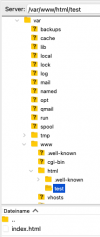
Is there any way to open this subfolder via the web browser to install Wordpress or is this not possible?
Thanks for your help!
I just ordered a virtual server at IONOS for creating a special web project. For this project it is necessary to install Wordpress on this server, but it is not possible to transfer the Domain to IONOS. This means I have to install Wordpress without having a Domain saved in Plesk Obsidian, so I am not able to use the Wordpress Tools in Plesk.
For this reason I have to install Wordpress manually. To keep the server structured, I would like to install Wordpress in a subfolder.
Unfortunately I am not able to access the subfolder via browser to start the installation process.
If I try to open the Server IP I will see the plesk standard page Web Server's Default Page but i am not able to navigate to the index.html in the test folder:
Is there any way to open this subfolder via the web browser to install Wordpress or is this not possible?
Thanks for your help!

