Facebook
 Twitter
I have a daily job that I run, written in php, which works fine when run manually from a browser, but fails on the following line when run as a schedulued (cron) job set up in plesk.
The line that has the issue is this:
The php script is located in /var/www/vhosts/compleit.com/customer/sm/cron
The db_con.php file that it is referencing is located in /var/www/vhosts/compleit.com/customer/sm/inc/_global
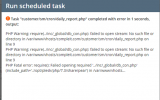
The error is attached.
I can get it to work as a cron job by changing the line to the following:
But I shouldn't need to specify the full path (and don't want to, as I want to use this code for customers other than 'sm'.
How do I get it to work in cron without having to specify the full path?
The line that has the issue is this:
require '../inc/_global/db_con.php';The php script is located in /var/www/vhosts/compleit.com/customer/sm/cron
The db_con.php file that it is referencing is located in /var/www/vhosts/compleit.com/customer/sm/inc/_global
The error is attached.
I can get it to work as a cron job by changing the line to the following:
require '/var/www/vhosts/compleit.com/customer/sm/inc/_global/db_con.php';But I shouldn't need to specify the full path (and don't want to, as I want to use this code for customers other than 'sm'.
How do I get it to work in cron without having to specify the full path?