
 Facebook
 Twitter
- Server operating system version
- Red Hat Enterprise Linux 8.8 (Ootpa)
- Plesk version and microupdate number
- Obsidian v18.0.55_build1800230919.07
Hello everyone,
I am having a problem setting up the email configuration under Plesk. For another Nextcloud instance, which is hosted externally (i.e., not on the same system as Plesk) but also uses Plesk as a mail relay, the same settings work perfectly. Therefore, I suspect that it has something to do with the fact that in the case of the Nextcloud Plesk extension, the system tries to use itself as a mail relay.
I installed the Nextcloud extension in the usual way, which worked wonderfully. In the mail settings, I then set the following:
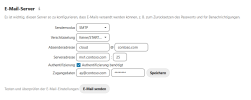
Then I receive the following error message: "There was a problem sending the email. Please check your settings. (Error: Email could not be sent. Check your email server log)". After which I check the mail log in Plesk, but they are completely empty. It seems as if the connection request never arrives at Postfix.
Then I tried changing the server address to "localhost", "127.0.0.1", and "172.16.50.10" (LAN IP of the Plesk server, located behind a NAT), after which I saw the following in the log:
I am aware that StartTLS cannot work here, but under "Encryption", I selected "None/STARTTLS", so why doesn't it then try "None"?
I'm a bit stuck and don't know what to do next. Maybe someone here can help me out!
Best regards,
Karsten
I am having a problem setting up the email configuration under Plesk. For another Nextcloud instance, which is hosted externally (i.e., not on the same system as Plesk) but also uses Plesk as a mail relay, the same settings work perfectly. Therefore, I suspect that it has something to do with the fact that in the case of the Nextcloud Plesk extension, the system tries to use itself as a mail relay.
I installed the Nextcloud extension in the usual way, which worked wonderfully. In the mail settings, I then set the following:
Then I receive the following error message: "There was a problem sending the email. Please check your settings. (Error: Email could not be sent. Check your email server log)". After which I check the mail log in Plesk, but they are completely empty. It seems as if the connection request never arrives at Postfix.
Then I tried changing the server address to "localhost", "127.0.0.1", and "172.16.50.10" (LAN IP of the Plesk server, located behind a NAT), after which I saw the following in the log:
| 2023-10-26 17:57:31 | info | postfix/smtpd [1683813] | disconnect from localhost.localdomain[::1] ehlo=1 starttls=1 commands=2 |
| 2023-10-26 17:57:31 | info | postfix/smtpd [1683813] | lost connection after STARTTLS from localhost.localdomain[::1] |
| 2023-10-26 17:57:31 | info | postfix/smtpd [1683813] | TLS SNI localhost from localhost.localdomain[::1] not matched, using default chain |
| 2023-10-26 17:57:31 | info | postfix/smtpd [1683813] | connect from localhost.localdomain[::1] |
I am aware that StartTLS cannot work here, but under "Encryption", I selected "None/STARTTLS", so why doesn't it then try "None"?
I'm a bit stuck and don't know what to do next. Maybe someone here can help me out!
Best regards,
Karsten
