Facebook
 Twitter
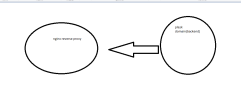
As you can see from the title, I want to create a structure like the one in the image, but I could not achieve this by reverse proxying a normal domain. What should I do?
Image attached....
idea or solution on how to do it
server {
listen 80;
location / {
proxy_pass http://xxx; # Backend IP
proxy_ssl_verify off;
proxy_set_header Host xxx.com; # Backend domain bilgisi
proxy_set_header X-Real-IP $remote_addr;
proxy_set_header X-Forwarded-For $proxy_add_x_forwarded_for;
proxy_set_header X-Forwarded-Proto $scheme;
}
}
I used this configuration