
 Facebook
 Twitter
Username:
TITLE
(minor/cosmetic, regression) Update notification is not removed after installing updates
PRODUCT, VERSION, OPERATING SYSTEM, ARCHITECTURE
Plesk Obsidian 18.0.38 Update 3, debian 9.13 x86_64
PROBLEM DESCRIPTION
Tools&Settings->System updates shows "updates available" even after applying said updates.
STEPS TO REPRODUCE
Tools&Settings->System updates
click button Update all (obviously requires updates to install)
ACTUAL RESULT
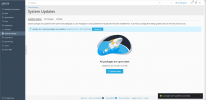
System reports "All packages are up-to-date", notification "... packages were updated successfully."
However, the message "Updates for ... system packages are available" does not go away, clicking "Recheck now" does not change that.
EXPECTED RESULT
the message "Updates for ... system packages are available" vanishes after successful package upgrade, like it did in Onyx
ANY ADDITIONAL INFORMATION
To make the message go away, the page has to be changed, e.g. clicking on All Packages and back
YOUR EXPECTATIONS FROM PLESK SERVICE TEAM
Confirm bug
TITLE
(minor/cosmetic, regression) Update notification is not removed after installing updates
PRODUCT, VERSION, OPERATING SYSTEM, ARCHITECTURE
Plesk Obsidian 18.0.38 Update 3, debian 9.13 x86_64
PROBLEM DESCRIPTION
Tools&Settings->System updates shows "updates available" even after applying said updates.
STEPS TO REPRODUCE
Tools&Settings->System updates
click button Update all (obviously requires updates to install)
ACTUAL RESULT
System reports "All packages are up-to-date", notification "... packages were updated successfully."
However, the message "Updates for ... system packages are available" does not go away, clicking "Recheck now" does not change that.
EXPECTED RESULT
the message "Updates for ... system packages are available" vanishes after successful package upgrade, like it did in Onyx
ANY ADDITIONAL INFORMATION
To make the message go away, the page has to be changed, e.g. clicking on All Packages and back
YOUR EXPECTATIONS FROM PLESK SERVICE TEAM
Confirm bug


