• Halloween is coming! To celebrate the occasion, we dusted off a couple of old skins, and even created a brand new one (Pixel).
    To get into the festive spirit, install the Skins extension.
  • The new Python extension is now available. It allows customers to deploy and manage WSGI-based Python applications on their websites directly from Plesk.
  • The Plesk Mobile apps for iOS and Android and the Plesk Mobile Center extension have been deprecated, and are no longer available for new installations. In Plesk Obsidian 18.0.84, the Plesk Mobile Center extension will be removed from servers during the upgrade, and the Plesk Mobile apps will lose their server management features.
  • The Social Login extension has been deprecated and will be removed in Plesk Obsidian 18.0.84. After that, it will no longer be possible to log in to Plesk with a Google, Facebook, GitHub account, or with a passkey. Plesk usernames and passwords, as well as logging in with a WebPros Account, are not affected.

Question Minor updates from GUI with Web Admin license?

JVG

Regular Pleskian
Server operating system version
Debian 12
Plesk version and microupdate number
Plesk Obsidian 18.0.79.4
Hi,

I have a server with WebAdmin License and Plesk Obsidian 18.0.79.4. Is it possible to update it to 18.0.79.5 from the GUI? The update buttons in the home page are not clear and from the Updates page seems only posible to update to the latest 18.0.80.X.

I'm not very familiar with WebAdmin but with webPro you have the option to apply only the minor update.
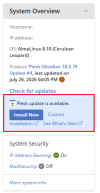
 
Yes, if you open the right side panel there is an update button that allows you up upgrade the the latest version in the current branch. Alternatively, on the Update page you can go to the "Update Components" and select every component.
update.png
 
  • Like
Reactions: JVG
Thanks @Kaspar ,

so to be clear, the "Install now" button will install 18.0.79.5 and not 18.0.80? With Web Host you get 2 buttons one for the minor update another for the latest.
 
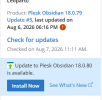
Yes, that's correct. If your server is already up to date with the latest update (in this case 18.0.79#5) the information near the button will tell that you can upgrade to the next release (18.0.80). Instead of the information saying that there is just an update available.

Screenshot 2026-08-07 111225.png
 
  • Like
Reactions: JVG
Thanks again,

It did exactly as you said. Coming from WebPro/WebHost it was a bit confusing.
 
Back
Top