
 Facebook
 Twitter
fabio.florencio
New Pleskian
Hi, there.
This is my first post here, and I'd like to share my problem with you and maybe solve it.
I'm experiencing some issues with Nextcloud and Nextcloud Docs (Collabora Online) via docker, or even with extension.
The problem is that when I try to paste an image from clipboard when editing any document, I receive this error:
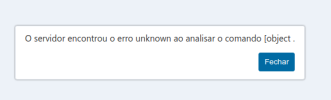
I tried a lot of tutorials trying to solve this problem, but always unsuccessfully.
Could you please help me to find some step by step configuration? Here some extra details about my environment (I don't know if there is some relation with this issue):
- We use Cloudflare, but not in proxy mode
- Use Let's Encrypt to server via SSL
- Use exclusive subdomain to serve Nextcloud
Thanks in advance.
This is my first post here, and I'd like to share my problem with you and maybe solve it.
I'm experiencing some issues with Nextcloud and Nextcloud Docs (Collabora Online) via docker, or even with extension.
The problem is that when I try to paste an image from clipboard when editing any document, I receive this error:
I tried a lot of tutorials trying to solve this problem, but always unsuccessfully.
Could you please help me to find some step by step configuration? Here some extra details about my environment (I don't know if there is some relation with this issue):
- We use Cloudflare, but not in proxy mode
- Use Let's Encrypt to server via SSL
- Use exclusive subdomain to serve Nextcloud
Thanks in advance.


