• The APS Catalog has been deprecated and removed from all Plesk Obsidian versions.
    Applications already installed from the APS Catalog will continue working. However, Plesk will no longer provide support for APS applications.
  • Please be aware: with the Plesk Obsidian 18.0.78 release, the support for the ngx_pagespeed.so module will be deprecated and removed from the sw-nginx package.

Question NextJs Deployement on Plesk. Giving 403 forbidden static folder.

Gagandeep

New Pleskian
Server operating system version
Ubuntu 20.04.1 LTS
Plesk version and microupdate number
Plesk Obsidian Version 18.0.60
I'm trying to deploy NextJs on Plesk server. My NodeJs version is "21.7.3".
My plesk Nextjs setup on NodeJs Extension is this as I've seen so many articles.
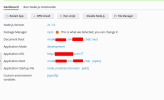
1718854347734.png

But It's giving me this 403 forbidden error which seems like permission error.
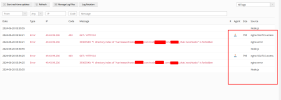
1718854533799.png

I've given my domain user , and also root and also nginx ... but none of them are working.
 
Did you configure any additional Nginx directives for the domain?
Hi Kasper
Thank you so much for reply

No , I created a sub-domain. Install create-next-app@latest. Then enable nodeJs, installed npm module then build, I check before build with "npm run dev" and after build with "npm run start" on my IP:3000. it's working fine. I've not changed anything in nginx.conf. It generated automatically.

It's seems like my document root pointing to static file but it'll not work. Server should know somehow he need to run next file which reside in node_modules. I'm trying everything but need help on this.
 
Back
Top