Facebook
 Twitter
CurtisBoylan
New Pleskian
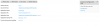
I am having an issue with my node.js with Phusion Passenger on my Plesk Onyx portal, for some reason it does not seem to be loading my server.js file correctly. I have tried to access it via the access link shown in the photo but when I do I am straight away pointed to the index.html when going by the sever.js file I should be pointed to the notfound.html file, when I load /addnew it says it is not found but that should point to the index.html and also all my post methods are not working neither. I have attached the code commenting out a few things but have left the important pieces in. Anyone able to see any issues with it or is it something I am setting up wrong? I also tried to access it via the port 900 but it says it is not found too. I also tried to change my port of the app.listen to 80 and still nothing. I will attach a img of my setup on the node.js on plesk and also a retracted copy of the server.js file on the following pastebin link: var express = require('express'); var app = express(); var path = require('pat - Pastebin.com
If anyone has any solutions i'd appreciate it. I have ran the same code base from multiple servers in the past with no issue.
If anyone has any solutions i'd appreciate it. I have ran the same code base from multiple servers in the past with no issue.