Follow along with the video below to see how to install our site as a web app on your home screen.
Note: This feature may not be available in some browsers.
The APS Catalog has been deprecated and removed from all Plesk Obsidian versions. Applications already installed from the APS Catalog will continue working. However, Plesk will no longer provide support for APS applications.
Please be aware: with the Plesk Obsidian 18.0.78 release, the support for the ngx_pagespeed.so module will be deprecated and removed from the sw-nginx package.
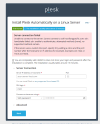
My Plesk trial key application is directed to automatic installation. However, in order to reactivate my Plesk account, I need the license key itself. The license key is not written in the email, it is just directed to automatic installation.
Additionally, could you please provide us with the hardware specifications on the machine you are trying to install the license on? Thank you in advance.
He mentioned that "In order to Reactivate my Plesk account" he wants to install trial key because automatic installation is detecting already installed plesk on server and not trying to install key if plesk is already installed...
Hello, @harisnaeem. With consideration to lowering fraudulent activates and abuse of the trial system a change of the workflow was implemented and trial license codes are no longer provided directly. In case the integrated installation method is not suitable option in your particular case, please open a General Enquiry from Plesk's Contact Form and provide our team with information on your exact situation - please include mode details on why you need to install Plesk on a server already running it. They will advise on the next best action.