• We value your experience with Plesk during 2025
    Plesk strives to perform even better in 2026. To help us improve further, please answer a few questions about your experience with Plesk Obsidian 2025.
    Please take this short survey:

    https://survey.webpros.com/
  • On Plesk for Linux mod_status is disabled on upgrades to improve Apache security.
    This is a one-time operation that occurs during an upgrade. You can manually enable mod_status later if needed.

Resolved Postfix for SMTP does not start -- can't diagnose

MHC_1

Regular Pleskian
Server operating system version
alma linux 9
Plesk version and microupdate number
18.0.74
Postfix was edited: main.cf .
Postfix was stopped to then be started again. (
Code:
# postfix stop && postfix start
)

Postfix starting failed. /etc/postfix/main.cf changes were rolled back and reuploaded. Permissions were checked. (0600)

Postfix still refuses to start.

Screenshot from 2026-01-20 14-46-06.png


Cmd:

Code:
# postfix start
postfix/postfix-script: starting the Postfix mail system
postfix/postfix-script: fatal: mail system startup failed


Checking the CMD states:

Screenshot from 2026-01-20 14-45-44.png

All initial changes had been rolled back. How to make this Postfix run or how to diagnose why this postfix is not running?

However, Plesk Milter Postfix does appear to be running:

Screenshot from 2026-01-20 14-54-43.png
 
Does postfix check output anything? And what details are logged in the system journal (journalctl -xeu postfix) about the failure?
 
Does postfix check output anything? And what details are logged in the system journal (journalctl -xeu postfix) about the failure?

Postfix check doesn't output anything.

But the journal command you put is more helpful possibly:

[root@server ~]# journalctl -xeu postfix
░░
░░ The job identifier is 21791663 and the job result is done.
Jan 20 15:58:48 server.co.uk systemd[1]: Starting Postfix Mail Transport Agent...
░░ Subject: A start job for unit postfix.service has begun execution
░░ Defined-By: systemd
░░ Support: Help and Support | AlmaLinux Wiki
░░
░░ A start job for unit postfix.service has begun execution.
░░
░░ The job identifier is 21791663.
Jan 20 15:58:49 server.co.uk systemd[1]: postfix.service: Control process exited, code=exited, status=1/FAILURE
░░ Subject: Unit process exited
░░ Defined-By: systemd
░░ Support: Help and Support | AlmaLinux Wiki
░░
░░ An ExecStart= process belonging to unit postfix.service has exited.
░░
░░ The process' exit code is 'exited' and its exit status is 1.
Jan 20 15:58:49 server.co.uk systemd[1]: postfix.service: Failed with result 'exit-code'.
░░ Subject: Unit failed
░░ Defined-By: systemd
░░ Support: Help and Support | AlmaLinux Wiki
░░
░░ The unit postfix.service has entered the 'failed' state with result 'exit-code'.
Jan 20 15:58:49 server.co.uk systemd[1]: Failed to start Postfix Mail Transport Agent.
░░ Subject: A start job for unit postfix.service has failed
░░ Defined-By: systemd
░░ Support: Help and Support | AlmaLinux Wiki
░░
░░ A start job for unit postfix.service has finished with a failure.
░░
░░ The job identifier is 21791663 and the job result is failed.

Also curiously, the system is still able to both send and receive to remote servers, it seems. Sending to my email addresses else where and receiving from them still works.

Also I forgot to clarify on the original question - when pressing to Go arrow on Tools --> Settings --> Server Management --> SMTP Server (Postfix) the result given by Plesk is "Unable to start service: Internal server error"
 
Unfortunately these journal entries don't tell much. The output also feels incompleet, are you sure that's all of the output? Usually you can scroll down (and up again) using the arrow keys if there is more in het journal. If there really is nothing else logged than what you've already posted try to restart postfix again (systemctl restart postfix) and look at the journal again, this time with journalctl -xeu postfix and scroll down till your hit the time stamp of the restart and look for any errors, failures, warnings, ect.
 
@Kaspar thanks for your help. Yes, this is all that it output it generates, it repeats and says there's ~7500 entrys. Every second or two it seems to be trying and failing to restart postfix.

Running :
[root@server ~]# systemctl restart postfix
Job for postfix.service failed because the control process exited with error code.
See "systemctl status postfix.service" and "journalctl -xeu postfix.service" for details.

I have also been reading other spaces, such as here: Postfix isn't running but won't start because "the Postfix mail system is already running" and wondering if removing the items in /var/spool/postfix/pid (there are many files here all zero file size, a couple for each process and domain name etc.) There is no master.pid here though.

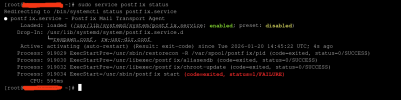
# systemctl status postfix.service
● postfix.service - Postfix Mail Transport Agent
Loaded: loaded (/usr/lib/systemd/system/postfix.service; enabled; preset: disabled)
Drop-In: /usr/lib/systemd/system/postfix.service.d
└─respawn.conf, rw-usr-dir.conf
Active: activating (auto-restart) (Result: exit-code) since Tue 2026-01-20 19:56:15 UTC; 1s ago
Process: 1168303 ExecStartPre=/usr/sbin/restorecon -R /var/spool/postfix/pid (code=exited, status=0/SUCCESS)
Process: 1168304 ExecStartPre=/usr/libexec/postfix/aliasesdb (code=exited, status=0/SUCCESS)
Process: 1168306 ExecStartPre=/usr/libexec/postfix/chroot-update (code=exited, status=0/SUCCESS)
Process: 1168307 ExecStart=/usr/sbin/postfix start (code=exited, status=1/FAILURE)
CPU: 600ms


At a loss how to resolve this.

AS I say, the system thinks postfix is not running, but emails are appearing to be delivered internally and externally so I believe it actually is running, am not sure how to further resolve.
 
@Kaspar

Further details from some exploration of what's processing on the Server:
I believe, the system thinks Postfix is not running, but emails are appearing to be delivered internally and externally so I believe it actually is running, am not sure how to further resolve.

So, I ran a list of current PID:

# ps -e | grep 'post'

[root@server ~]# ps -ef | grep 'post'
root 877208 1 0 14:00 ? 00:00:04 /usr/libexec/postfix/master -w
postfix 877221 877208 0 14:00 ? 00:00:03 qmgr -l -t fifo -u
postfix 877226 877208 0 14:00 ? 00:00:00 tlsmgr -l -t unix -u
postfix 903686 1 0 14:30 ? 00:00:02 /usr/lib64/plesk-9.0/psa-pc-remote -p inet:[email protected] -t 7210 -P /run/psa-pc-remote.pid -u postfix -g popuser -n
postfix 1026345 877208 0 16:54 ? 00:00:00 anvil -l -t unix -u
postfix 1124982 877208 0 19:00 ? 00:00:00 pickup -l -t fifo -u
postfix 1156958 877208 0 19:41 ? 00:00:00 spawn -z -n 127.0.0.1:12346 -t inet user=popuser popuser argv=/usr/lib64/plesk-9.0/postfix-srs
postfix 1176463 877208 0 20:06 ? 00:00:00 proxymap -t unix -u
postfix 1177071 877208 0 20:07 ? 00:00:00 spawn -z -n 127.0.0.1:12346 -t inet user=popuser popuser argv=/usr/lib64/plesk-9.0/postfix-srs
postfix 1179411 877208 0 20:10 ? 00:00:00 smtpd -n smtp -t inet -u -o stress= -s 2
postfix 1179412 877208 0 20:10 ? 00:00:00 postlogd -l -n postlog -t unix-dgram -u
postfix 1179418 877208 0 20:10 ? 00:00:00 trivial-rewrite -n rewrite -t unix -u
popuser 1179419 1156958 0 20:10 ? 00:00:00 /usr/lib64/plesk-9.0/postfix-srs
postfix 1179420 877208 0 20:10 ? 00:00:00 cleanup -z -t unix -u
popuser 1179421 1177071 0 20:10 ? 00:00:00 /usr/lib64/plesk-9.0/postfix-srs
postfix 1179425 877208 0 20:10 ? 00:00:00 pipe -n plesk_virtual -t unix flags=DORhu user=popuser popuser argv=/usr/lib64/plesk-9.0/postfix-local -f ${sender} -d ${recipient} -p /var/qmail/mailnames -q ${queue_id}
postfix 1179434 877208 0 20:10 ? 00:00:00 smtpd -n smtp -t inet -u -o stress= -s 2
root 1180253 1147766 0 20:11 pts/1 00:00:00 grep --color=auto post


From this Postfix appears to be running as a Dummy Foreground service with `master -W`.

Further with:

# ps -e | head -1; ps -e | grep "post"

PID TTY TIME CMD
1180857 ? 00:00:00 postlogd
1181266 ? 00:00:00 postfix-srs
1183343 ? 00:00:00 postfix-srs
 
@Kaspar

I think I've found the issue :

Code:
From syslog

server setroubleshoot[876971]: SELinux is preventing /usr/sbin/postlog from sendto access on the unix_dgram_socket /var/spool/postfix/public/postlog.

***** Plugin catchall (100. confidence) suggests **************************
If you believe that postlog should be allowed sendto access on the postlog unix_dgram_socket by default.#012Then you should report this as a bug.
You can generate a local policy module to allow this access.
Do
allow this access for now by executing:
# ausearch -c 'postlog' --raw | audit2allow -M my-postlog
# semodule -X 300 -i my-postlog.pp


Can I disable SELinux for the purpose of setting up Postfix so once it starts running and then re-enable SELinux? Advice welcome.
 
I found the solution -- the issue was caused by SELinux disallowing the postfix to access /var/log/maillog.
> SELinux is preventing /usr/libexec/postfix/postlogd from open access on the file /var/log/maillog

This was stopping the postfix from completing it's startup and preventing error logging into `maillog`.

I found this warning notice inside `/var/log/syslog`

Solution

At the command line, set SELinux to `permissive` :

# setenforcing 0

and check:
# getenforce
Permissive

Then, closing all the running processes of postfix (because `postfix stop` doesn't work):

# killall -u postfix

And finding the current PID of the root postfix implementation:
# ps -ef | head -1; ps -ef | grep "postfix"
UID PID PPID C STIME TTY TIME CMD
root 215243 1 0 11:11 ? 00:00:00 /usr/libexec/postfix/master -w

And then using that to kill the root postfix
# kill 215243

And then restarting postfix with the standard:

# service postfix start

And finally reverting the SELinux setting:
# setenforcing 1

and check:

# getenforce
Enforcing

To show SELinux is doing it's thing again correctly.

This is now fully resolved. Thank you.
 
Back
Top