• Debian 11 is approaching its end-of-life (vendor EOL date - August 31, 2026). Plesk Obsidian 18.0.80 will be the last release to support it.
    If you are running Plesk Obsidian on Debian 11, we recommend you upgrade those servers to Debian 12 using our dist-upgrade tool.
  • We plan to deprecate and remove the support for XML RPC protocol versions earlier than 1.6.9.1 in Plesk Obsidian 18.0.82. We strongly recommend that you update all existing integrations using earlier versions of the XML RPC protocol to comply with the version 1.6.9.1 specification.

Resolved [PPP-48341] Unable to create PostgreSQL service

simoncsc

New Pleskian
Hi,

I installed PostgreSQL sever on my latest version plesk with Centos 7, but couldn't start the service, here is the captured screen.
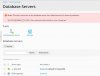
postpresql_failed1.JPG
I click on the localhost(PostgreSQL), then enter the username and password, after clicking OK, the screen is displayed as below:

postpresql_500.JPG
then I followed the instructions to type these two command via SSH "systemctl status postgresql.service" &
"journalctl -xe" , below is the output:

postpresql_failed3.JPG

postpresql_failed4.JPG
Any body can help me to fix this problem?

Best regards,

Simon

 

Attachments

  • postpresql_failed2.JPG
    postpresql_failed2.JPG
    66.1 KB · Views: 2
  • postpresql_failed2.JPG
    postpresql_failed2.JPG
    66.1 KB · Views: 1
@simoncsc,

Seems like the PostgreSQL instance is not initialized (as it reports empty data directory error). Seems like we don't initialize it anymore after installation, which is reported as bug with ID PPP-48341.

It should work if you run postgresql-setup initdb manually in console and only then then add the database server to Plesk.
 
Thank you for your reply, I run the command your provided, but fail, below is the error message and initdb log.
postpresql_error4.JPG

postpresql_error5.JPG
does it means I need to create a user "postgres" to run the command?
 
Hi

I have fixed the problem, solution: remove postpresql > delete folder /var/lib/pgsql > re-install postpresql > run postgresql-setup initdb
 
Back
Top