Follow along with the video below to see how to install our site as a web app on your home screen.
Note: This feature may not be available in some browsers.
The APS Catalog has been deprecated and removed from all Plesk Obsidian versions. Applications already installed from the APS Catalog will continue working. However, Plesk will no longer provide support for APS applications.
Please be aware: with the Plesk Obsidian 18.0.78 release, the support for the ngx_pagespeed.so module will be deprecated and removed from the sw-nginx package.
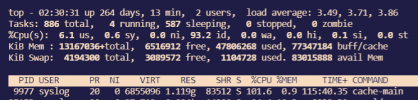
I have a Plesk server on Ubuntu 18 and every day this process uses 100% until I kill it. Does anybody know what this process does?
It runs with user syslog and command cache-main.
That process looks suspicious to me. You should investigate it to find out where the binary lives and which process was calling it.
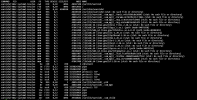
List open files/descriptors/sockets of the process: lsof -p 9977
Retrieve parent process ID: ps -o ppid= -p 9977
Then do lsof -p with the parent process ID
Also, do a full "ps auxwww" to list all of your processes.
Ah OK, so "cache-main" belongs to Varnish, so nothing suspicious.
I can't tell you why that varnish process has such a high CPU usage, you will have to debug that using varnishtop and other tools, but this is outside of the scope of Plesk. Also, check your varnish logs if you see anything that will give you an indication about what's going on.