Facebook
 Twitter
LordReaper
New Pleskian
- Server operating system version
- Ubuntu 20.04
- Plesk version and microupdate number
- 18.0.60_build1800240421
Hi,
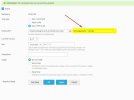
i am trying to set up a cronjob to a php file located in the folder of a website. What i basically try to do is to get this URL: "https://myhop.com/plugins/myplugin/sync.php?action=reindex" in a cronjob. So i set up a scheduled task and chose "run a php script". In the field "arguments" i try to enter "reindex" but this does not work The script runs but finishes after one second. It says succesful but the problem is that the argument is not recognized correctly. How do i have to set up the cronjob, that the argument "reindex" is being triggered? When i enter nothing in the argument field i get an error that i should provide an argument. On the other hand i can also write other words in the argument field and the result is the same. It runs a second, says it runned succesfully but nothing happend.
Can someone tell me how to run the task and how to enter the arguments there, that this happens? Can i run this "sync.php?action=reindex" in a cronjob? Or how do i have to enter the arguments there? I als tried those variations:
--reindex
-reindex
action=reindex
--action=reindex
none of them works
Thanks for any ideas or help.
Greetings
i am trying to set up a cronjob to a php file located in the folder of a website. What i basically try to do is to get this URL: "https://myhop.com/plugins/myplugin/sync.php?action=reindex" in a cronjob. So i set up a scheduled task and chose "run a php script". In the field "arguments" i try to enter "reindex" but this does not work The script runs but finishes after one second. It says succesful but the problem is that the argument is not recognized correctly. How do i have to set up the cronjob, that the argument "reindex" is being triggered? When i enter nothing in the argument field i get an error that i should provide an argument. On the other hand i can also write other words in the argument field and the result is the same. It runs a second, says it runned succesfully but nothing happend.
Can someone tell me how to run the task and how to enter the arguments there, that this happens? Can i run this "sync.php?action=reindex" in a cronjob? Or how do i have to enter the arguments there? I als tried those variations:
--reindex
-reindex
action=reindex
--action=reindex
none of them works
Thanks for any ideas or help.
Greetings