Question Which Shell Should be used for Cronjobs?

MHC_1

Regular Pleskian
Server operating system version
alma linux 9.7
Plesk version and microupdate number
18.0.76#4
As you may be aware, cronjobs on Plesk are a mess. I am trying to work out how to run Cron PHP scripts. I have numerous issues previously mentioned on this forum with some mixed results and some badly long winded solutions to the way Plesk chooses to deal with Cronjobs .

Anyways, some cronjobs work ok. Others do not. No cron jobs ever work from the Plesk scheduled task GUI.

I am looking into the
Code:
/var/logs/cron
file and seeing references to
Code:
/var/spool/cron/<account>
. Within these I see multiple cron commands but they HAVE DIFFERENT SHELLS.
MAILTO="[email protected]"
SHELL="/bin/sh"
#@desc: CalProcessing
<line removed as can't post to forum>

MAILTO="[email protected]"
SHELL="/usr/local/psa/bin/chrootsh"
#@desc: Cal Processing 2
<line removed as can't post to forum>

So; both of these shells are present and both of these Cronjobs are present but I can't confirm either of these Crons work in the wild.

WHICH SHELL IS MORE LIKELY TO SUCCEED?

WHY ARE THEY DIFFERENT?
 
Hi, @MHC_1 . Could you please double-check if the cron with the /bin/sh is configured as "Fetch a URL" type? If yes, this is an expected behavior as the "Fetch a URL" scheduled tasks always use the /bin/sh shell.
 
Hi, @MHC_1 . Could you please double-check if the cron with the /bin/sh is configured as "Fetch a URL" type? If yes, this is an expected behavior as the "Fetch a URL" scheduled tasks always use the /bin/sh shell.
Hello
Thanks for getting back to me. None of our cronjobs use fetch URL, they're always "Run command" or "Run PHP Script" .

Also further rumination on this I wonder perhaps the different Shell is from setting the Cronjob in the Admin level rather than the Account or Subscription level? Either way, Which Shell should be used?
 
By default, the shell defined in Tools & Settings > Scheduled Tasks (Cron jobs) > Settings is used. However, that could be overridden on a subscription level from Subscriptions > example.com > Hosting & DNS > Hosting > SSH access. Could you please double-check the list of tasks in the account corresponding to the user in /var/spool/cron/<account> from Subscriptions > example.com > Dashboard > Scheduled Tasks, as well as the shell defined for the subscription (if any)?
 
By default, the shell defined in Tools & Settings > Scheduled Tasks (Cron jobs) > Settings is used. However, that could be overridden on a subscription level from Subscriptions > example.com > Hosting & DNS > Hosting > SSH access. Could you please double-check the list of tasks in the account corresponding to the user in /var/spool/cron/<account> from Subscriptions > example.com > Dashboard > Scheduled Tasks, as well as the shell defined for the subscription (if any)?
Thank you for this.

I hadn't realised that the SSH Access also impacts the Cronjob system. Is this documented anywhere?

And so back to the original question -- the account SSH access from external devices will always be chrooted access type. How does this impact scripts (PHP mostly but also possibly Perl scripts) running on the account? The PHP on the account's cron job already doesn't use the account PHP settings (per numerous other posts in recent months on this). So worth asking specifically how this impacts? Cheers
 
You are welcome. I am linking the docs:
And so back to the original question -- the account SSH access from external devices will always be chrooted access type. How does this impact scripts (PHP mostly but also possibly Perl scripts) running on the account? The PHP on the account's cron job already doesn't use the account PHP settings (per numerous other posts in recent months on this). So worth asking specifically how this impacts?

I am afraid, I am not quite sure I got this part of the question. Sorry. When you configure a "Run a PHP script" type of a cron, you get a dropdown you can select the PHP version from. If the cron is configured as "Run a command", unless you specify the full path to the desired PHP version's binary, the php command calls the binary installed by the PHP version provided by the operating system repository. Or do you mean that the scheduled tasks you have configured intentionally use a different PHP version?
 
@Sebahat.hadzhi Hello.
Your posts here imply that the Account --> Host Settings --> SSH Access directly effects how Cronjobs are run . We here are not talking about PHP versions but that some
Code:
/var/spool/cron/<account>
files contain different SSH Shells than others, and given the apparent inconsistency with cronjobs in general I was asking what cause is for differing shell types when shells set via the GUI are always chrooted. There appears to be no documentation so I don't know where this difference in the file comes from. Thank you.
 
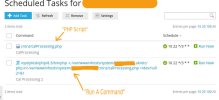
The only reason, I can point out for the different shell is the "Fetch URL" type of a cron. Back to my question from post #4 - Could you please double-check the list of tasks in the account corresponding to the user in /var/spool/cron/<account> from Subscriptions > example.com > Dashboard > Scheduled Tasks, as well as the shell defined for the subscription (if any)?
 
The only reason, I can point out for the different shell is the "Fetch URL" type of a cron. Back to my question from post #4 - Could you please double-check the list of tasks in the account corresponding to the user in /var/spool/cron/<account> from Subscriptions > example.com > Dashboard > Scheduled Tasks, as well as the shell defined for the subscription (if any)?
2026-04-10--12-30-38.jpg
 
@MHC_1 , apologies for the delayed reply. After a further check, I can confirm that it is also expected for "Run a PHP script" to also use SHELL="/bin/sh" rather than the shell defined on system/subscription level. If you need the task to run in chrooted environment, you can add the php script as "Run a command" similarly to the example from your screenshot. Or if needed by:
 
@Sebahat.hadzhi

THERE IS STILL AN ISSUE HERE using the same command shape as in the screenshot of mine above.

We have issues with Cron Job not executing,and with investigation we find that the /var/spool/cron/account file has :


SHELL="/usr/local/psa/bin/chrootsh"


but I had explicitly set the file to, as you put above in your guidance -- "SHELL="/bin/sh"


Order of events:

1) CRON WAS NOT WORKING
2) Var/spool/cron was opened and updated manually to replace "SHELL="/usr/local/psa/bin/chrootsh" " with "SHELL="/bin/sh"
3) Cron jobs worked

4) SOMETHING THIS EVENING CHANGED THE FILE

5) This morning var/spool/cron file now shows ""SHELL="/usr/local/psa/bin/chrootsh"" and crons are not working

6) Cron error: " -: line 1: /opt/plesk/php/8.3/bin/php: No such file or directory "

Why does plesk Do this?!!

How do we explicitly set the Cron Shell to WORK and to not keep breaking itself


Plesk, why is it so broken?!


Please give guidance.


WE NEED THE CRON TO OPERATE under bin/sh shell, this WORKS ; the exact command given works under bin/sh but does not work under "/usr/local/psa/bin/chrootsh".
 
Could you please confirm if there are any WordPress-based websites under the affected subscription and if "Take over wp-cron.php" is enabled on any of them?
 
The cronjob is the same format / type as the "Run a command" PHP cron job as exampled in screenshot on this thread of 10th April 2026.

Plesk had already / previously been updated to 18.0.78#2
 
Thank you for the confirmation. Could you please provide the entries logged at /var/log/cron roughly at the you noticed the shell was changed as well as the output from the following command:

Code:
plesk db "select date, ip_address, user, action_name, component, old_value, new_value from log_actions join log_components on log_actions.id = log_components.action_id where component = 'System Shell'"
 
Thank you for the confirmation. Could you please provide the entries logged at /var/log/cron roughly at the you noticed the shell was changed as well as the output from the following command:

Code:
plesk db "select date, ip_address, user, action_name, component, old_value, new_value from log_actions join log_components on log_actions.id = log_components.action_id where component = 'System Shell'"


Hello,
Apologies for the slight delay in getting back to you on this.

1)

/var/log/cron around the time we found the issue appears ok:

Jun 11 00:06:01 server CROND[373635]: (le-account) CMD (/opt/plesk/php/8.3/bin/php -c /var/www/vhosts/system/account.co.uk/etc/php.ini /var/www/vhosts/account.co.uk/cronmailer/cron_mailer.php)
...
Jun 11 00:06:01 server CROND[373601]: (le-account) CMDEND (/opt/plesk/php/8.3/bin/php -c /var/www/vhosts/system/account.co.uk/etc/php.ini /var/www/vhosts/account.co.uk/cronmailer/cron_mailer.php)

All (many) Cron entries all appear like this.

2)

The command "plesk db "select date, ip_address, user, action_name, component, old_value, new_value from log_actions join log_components on log_actions.id = log_components.action_id where component = 'System Shell'"" gives no output.


3)

Since manually editing the /var/spool/cron/account file we have not looked into the cron "Scheduled Task" tab in the Plesk, and it appears the crons are running correctly. (touch wood!)
 
Back
Top