
 Facebook
 Twitter
TaskSoftware
New Pleskian
[SOLVED] Scheduled tasks 'Tools' area blank
I use Plesk 9.5
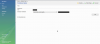
I'm trying to add a new scheduled task using a customer's user (not admin), and the area 'Tools' where it should appear the 'Schedule New Task' icon are in blank. Do I need to activate this somewhere? When I log in with the admin user, I can see the icon and it allows me to add a new task as it should normally.
I use Plesk 9.5
I'm trying to add a new scheduled task using a customer's user (not admin), and the area 'Tools' where it should appear the 'Schedule New Task' icon are in blank. Do I need to activate this somewhere? When I log in with the admin user, I can see the icon and it allows me to add a new task as it should normally.
Attachments
Last edited:


