• We value your experience with Plesk during 2025
    Plesk strives to perform even better in 2026. To help us improve further, please answer a few questions about your experience with Plesk Obsidian 2025.
    Please take this short survey:

    https://survey.webpros.com/

Issue Server keeps crashing. Is it memory or something else I am missing?

johnamber

New Pleskian
Server operating system version
CentOS Linux 7.9.2009 (Core)
Plesk version and microupdate number
Plesk Obsidian v18.0.74_build1800251204.13 os_CentOS 7
Hello,

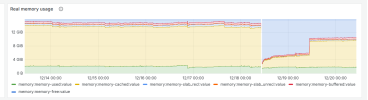
Our server went down twice this month, and I am having trouble figuring out the cause. What I did find was that the memory caching keeps building up over time slowly. I was under the impression that it dumps cache as new processes are needed, but not sure if that is the case and is what is causing the system crashes. When the system went down on 12/04 the memory cache wasn't at peak though. That is if both crashes are related at all, and if memory is even the issue? Maybe it is Mysql?

When I reboot the system the Plesk logs start at the time of reboot. Any help would be greatly appreciated on where to look now.

Thanks in advance,
Johnny
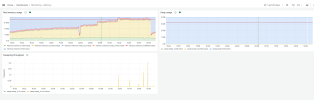
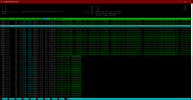
1766159802324.png
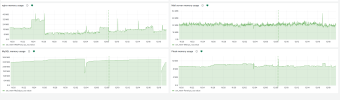
1766160034354.png
 
Please explain what you meant by 'server went down' or 'system crashes'
Hello WHA,
Surely... When whichever event cause the server to crash then I cannot access anything on the server, not even SSH. I then have to reboot the server and everything runs smoothly for a bit. This has happened numerous times... btw I do have fail2ban and other security measures enabled as such with plesk.

I wasn't sure if this type of memory use is normal but seemed off.

Thanks! Johnny

1766245470868.png
 
Based on the graphs you posted, your memory usage looks completely fine and is likely not the cause of your server freezing up. Also see: Help! Linux ate my RAM!

If you can't access your server via SSH, try to see if you can access it via a remote/virtual console from your provider and investigate from there.
 
Last edited:
Based on the graphs you posted, your memory usage looks completely fine and is likely not the cause of your server freezing up. Also see: Help! Linux ate my RAM!

If you can't access your server via SSH, try to see if you can access it via a remote/virtual console from your provider and investigate from there.

Thanks for your help. That link was one of the first places I visited when I was researching the server issue. I know IONOS has a 'serial console' for dedicated servers. If or when this arises again then I will have do that.

For now, I am trying to discover what caused it from what I can access and is available at this point. Trying to find what event that triggered Plesk and websites to go down?

Appreciate the input and help,
Johnny
 
See if you can find anything with, (run as root)

#dmesg -T | egrep -i "oom|out of memory|kill process|hung task|blocked for|I/O error|reset|nvme|ext4|xfs|panic|segfault" | tail -n 200
 
See if you can find anything with, (run as root)

#dmesg -T | egrep -i "oom|out of memory|kill process|hung task|blocked for|I/O error|reset|nvme|ext4|xfs|panic|segfault" | tail -n 200

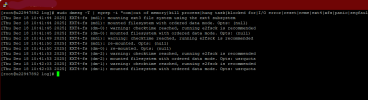
I ran the command and got this result... I was looking up e2fsck and read that it is not safe to run on mounted disk... not sure what options to use.
I'll definitely make sure I backup the server right before anything is done when the time comes.

What is your suggestion?

Thanks in advance, Johnny

1766462036935.png
 
I don’t think there is anything in the provided image that indicates the cause of the server hang.

At this stage, I would recommend starting with server-level hardware diagnostics. Unfortunately, I’m not very familiar with IONOS dedicated servers, as their infrastructure and tooling differ from providers like OVH.

For reference, OVH provides detailed documentation on running hardware diagnostics on dedicated servers:

If similar tooling is available in IONOS, I would first start with a full memory test, as RAM issues can cause complete system hangs where even SSH becomes unavailable.

It’s also worth confirming whether this is a true dedicated server or a KVM-based. If it is a VM with dedicated hardware, hardware diagnostics may need to be performed by the provider.
 
Just sharing one of my personal experiences —

I had a similar experience with one of my dedicated servers running AlmaLinux 8.

After running without issues for a few months, the server hung randomly on two separate nights, and the server provider’s staff had to manually reboot it, as the system was completely unresponsive (including SSH).

After the second incident, I updated the system fully, including the kernel:

#yum clean all
#yum update

Since then, the issue has not reoccurred, and it has been running stable for several months.

That said, I’m still not certain what the root cause was — whether the yum update (kernel update) resolved a software issue, or whether the hosting provider identified and fixed a hardware-related problem in the background(but the report didn't include anything other than they restarted server). Unfortunately, I never had a chance to fully determine the actual cause.
 
Have you seen this thread? It sounds like the issue you're having:
 
Just sharing one of my personal experiences —

I had a similar experience with one of my dedicated servers running AlmaLinux 8.

After running without issues for a few months, the server hung randomly on two separate nights, and the server provider’s staff had to manually reboot it, as the system was completely unresponsive (including SSH).

After the second incident, I updated the system fully, including the kernel:

#yum clean all
#yum update

Since then, the issue has not reoccurred, and it has been running stable for several months.

That said, I’m still not certain what the root cause was — whether the yum update (kernel update) resolved a software issue, or whether the hosting provider identified and fixed a hardware-related problem in the background(but the report didn't include anything other than they restarted server). Unfortunately, I never had a chance to fully determine the actual cause.

WHA,

Thanks for the input and I will be updating the system as well as steps from your previous reply. IONOS has something called 'serial console', which I believe is the equivalent to what you're referencing.

I will let you know what the results are.

Happy New Year,
Johnny
 
Have you seen this thread? It sounds like the issue you're having:
Maarten,

Hmm, seems plausible and will check this out today. I'll backup the system and give it a try. I'll post what I find.

Thanks a bunch and happy new year!

Johnny
 
Back
Top