Facebook
 Twitter
- Server operating system version
- Ubuntu 22.04
- Plesk version and microupdate number
- 18.0.66 #1
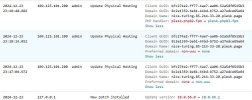
Since some days the "open in browser" and the "website preview" do not function with the plesk-developer-domain and its subdomains. I get a strange Url in preview like : https://tp545224.nice-toring.85-217-33-22.plesk.page.85-217-33-20.85.214.33.22.plesk.page/ . The "open in browser" hangs.
I have already tried to adjust under tools-settings: website-preview , restarted the server , actualisized the system files and newest plesk-version. The repair-functions show no error.
2 ordinary domains which do not use Plesk-Dns , function with above.
I have already tried to adjust under tools-settings: website-preview , restarted the server , actualisized the system files and newest plesk-version. The repair-functions show no error.
2 ordinary domains which do not use Plesk-Dns , function with above.