• We value your experience with Plesk during 2025
    Plesk strives to perform even better in 2026. To help us improve further, please answer a few questions about your experience with Plesk Obsidian 2025.
    Please take this short survey:

    https://survey.webpros.com/
  • On Plesk for Linux mod_status is disabled on upgrades to improve Apache security.
    This is a one-time operation that occurs during an upgrade. You can manually enable mod_status later if needed.

Resolved Steps to understand why emails are being sent from localhost instead of domain?

MHC_1

Regular Pleskian
Server operating system version
Alma Linux 9.7
Plesk version and microupdate number
Obsidian 18.0.75
I have just set up the Plesk Email Security Extension and now my emails are being marked as spam - I believe - because they're being sent to remote addresses as if from localhost.

This is happening to emails from various accounts on the server . All accounts have fully valid SPF , DMARC and DKIM records. The Server IP should not be blacklisted. But the emails are coming in consistently as "SPAM", since this change over.

1) Is Plesk Email Security to blame?

2) If not; how to fix this and set emails going externally to be coming from the correct domain name?

Received email header in full:
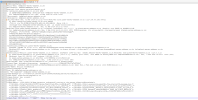
Screenshot from 2026-02-02 16-40-10.png

See the lines:

spf=pass (sender IP is 127.0.0.1) smtp.mailfrom=[email protected] smtp.helo=plesk-server-address.co.uk

And

Received-SPF: pass (plesk-server-address.co.uk: localhost is always allowed.) client-ip=127.0.0.1; envelope-from=[email protected]; helo=plesk-server-address.co.uk;
X-Spam-Level:
Authentication-Results: plesk-server-address.co.uk (amavis); dkim=pass (2048-bit key) header.d=plesk-server-address.co.uk
Received: from plesk-server-address.co.uk ([127.0.0.1]) by plesk-server-address.co.uk (plesk-server-address.co.uk [127.0.0.1]) (amavis, port 10024) with ESMTP id K0tr2xyzfWGU for <[email protected]>; Mon, 2 Feb 2026 16:12:17 +0000 (UTC) Received: from [90.158.223.116] (unknown [185.248.15.80])
by plesk-server-address.co.uk (Postfix) with ESMTPSA id 200185200014D for <[email protected]>; Mon, 2 Feb 2026 16:12:17 +0000 (UTC)

Which look dodgy that it's appearing to send from localhost. rather than the sending domain ,
 
Do I understand correctly that this happen only when sending an email from your Plesk server to a external recipient? Does that apply one specific recipient? Or also when, for example, sending mail to a free mail service like Gmail and Outlook?

Are your emails rejected by the recipient server? Or just marked as spam?
 
Do I understand correctly that this happen only when sending an email from your Plesk server to a external recipient? Does that apply one specific recipient? Or also when, for example, sending mail to a free mail service like Gmail and Outlook?

Are your emails rejected by the recipient server? Or just marked as spam?
Hello

This happens from multiple domains on the Plesk server, to a specific target email (my work email address). My concern is seeing that the email appear from "Localhost" and that 127.0.0.1 is passing the SPF / etc. which is an email header content [127.0.0.1 / localhost] I'm not used to seeing at the receiving end.

I thought perhaps my VPN was causing an issue (my mailbox sending IP) but turning the VPN off and sending emails also come up marked as spam. Other emails from Plesk to the same address have the same "Spam" notice. Emails are not rejected (they can be delayed) but are marked as spam.

The sending domains all pass all the checks by the Plesk Email Security Extension. Previous months sending emails from these domains for testing purposes has not caused unresolved spam indicators.
 
This happens from multiple domains on the Plesk server, to a specific target email (my work email address). My concern is seeing that the email appear from "Localhost" and that 127.0.0.1 is passing the SPF / etc. which is an email header content [127.0.0.1 / localhost] I'm not used to seeing at the receiving end.
I doubt this is the cause of the issue, but in theory it's possible.

What spamfilter software is installed in the receiving server? Is it SpamAssasin?
 
What spamfilter software is installed in the receiving server? Is it SpamAssasin?

Yes, it is. Usually SpamAssassin gives quite a comprehensive readout as to why it gives the mark it gives but in these cases it doesn't, (as you can see full header from receiver is shown)

If you think that SPF for 127.0.0.1 is ok in this context, I'm happy with that -- to me, doing SPF for 127.0.0.1 seems illogical and the core cause of this query!

The amavis reference in the header also directly comes from the Plesk Email Security Extension and this (Amavis) is something I'm not at all familiar with so will read up on that. That's the only other thing that's notably changed in the header info.
 
Are you running cPanel on the receiving server by any chance? If so, there is a known issue with encoding use for the X-Spam-Reports header, causing the spam report header to be unreadable. They published a workaround to make the reports readable again in the header. The reports header should than give you (some) clues as to why the email got marked as spam.

As for the SPF for 127.0.0.1, that's likely an OK and expected result. Also see: https://support.plesk.com/hc/en-us/...PF-Authentication-SPF-Failed-for-IP-127-0-0-1
 
Back
Top