• We value your experience with Plesk during 2025
    Plesk strives to perform even better in 2026. To help us improve further, please answer a few questions about your experience with Plesk Obsidian 2025.
    Please take this short survey:

    https://survey.webpros.com/

Strange Cron Behavior

Serg1

New Pleskian
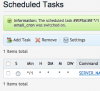
I've scheduled a task, that I also ran from terminal to make sure it works, but it's behaving very strangely within Plesk.

1) The job never actually runs
2) The little icon that shows cron's on/off status is always off but if I click it it tells me that it just turned on. It stays off though.
 

Attachments

  • Screen Shot 2015-04-08 at 6.41.27 AM.png
    Screen Shot 2015-04-08 at 6.41.27 AM.png
    40.6 KB · Views: 6
Ok, so running it from Server > Scheduled Tasks under root works fine. I guess I'm ok but I would like to understand why it didn't work after being set up via Websites & Domains > Scheduled Tasks.
 
Hi Serg1,

first you should be informed, that the domain has to be setup for shell - access.
The standard shell - access will be a chrooted shell for the domain - system - user.
The global settings for the domain - specific chrooted shell commands is limited and doesn't include the whole server - wide commands, based on the installed packages, it only includes commands which are configured at "/var/www/vhosts/chroot/bin".

You can solve your issue, by following the suggestions from the KB - article:

... or you can change the standard shell - access to "bin/bash" over: example.com > Websites & Domains > FTP - Access ... and open the chroot to more commands than defined at "/var/www/vhosts/chroot/bin". Please use the whole system - path for your commands ( i.e. "/usr/bin/wget http://www.example.com/cron.php" ).

!!! Please keep in mind, that both suggestions open the chroot environment and the domain - specific - system - user can use as well insecure commands !!!


Another way is described in a different post here:

 
Back
Top