• The new Python extension is now available. It allows customers to deploy and manage WSGI-based Python applications on their websites directly from Plesk.
  • The Plesk Mobile apps for iOS and Android and the Plesk Mobile Center extension have been deprecated, and are no longer available for new installations. In Plesk Obsidian 18.0.84, the Plesk Mobile Center extension will be removed from servers during the upgrade, and the Plesk Mobile apps will lose their server management features.
  • The Social Login extension has been deprecated and will be removed in Plesk Obsidian 18.0.84. After that, it will no longer be possible to log in to Plesk with a Google, Facebook, GitHub account, or with a passkey. Plesk usernames and passwords, as well as logging in with a WebPros Account, are not affected.

Strange folders in user home folder

MarwinH

New Pleskian
Hi All,

I am using the panel-version: 11.5.30 Update #32

The server Ubuntu 12.04.4 LTS was installed new recently.

All domains show a normal user home folder structure:

/var/www/vhosts/domain.tld/error_docs
/var/www/vhosts/domain.tld/httpdocs
/var/www/vhosts/domain.tld/logs
/var/www/vhosts/domain.tld/mivadata

but one domain got some strange folders I wonder about:
/var/www/vhosts/domain.tld/bin
/var/www/vhosts/domain.tld/dev
/var/www/vhosts/domain.tld/etc
/var/www/vhosts/domain.tld/lib
/var/www/vhosts/domain.tld/tmp
/var/www/vhosts/domain.tld/usr
/var/www/vhosts/domain.tld/var

Most of those folders contain system files owned by the root user.

Is there a good reason for the existence of those folders?

So far I have not done any modification to the server.

Regards and thanks
 
The following files...

/var/www/vhosts/domain.tld/bin
/var/www/vhosts/domain.tld/dev
/var/www/vhosts/domain.tld/etc
/var/www/vhosts/domain.tld/lib
/var/www/vhosts/domain.tld/tmp
/var/www/vhosts/domain.tld/usr
/var/www/vhosts/domain.tld/var

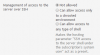
are there because the subscription has one of...

allow-ssh.png

enabled I believe.

Change in..

Plesk -> Subscriptions -> domain.tld -> Customize -> Permissions.

I hope that helps.
 
Sorry for replying on a old topic, but i'm running into the same problem.
How to remove this files after they are created? I didn't intentionally change something to enable this chrooted shell access.
In the Subscriptions they are also on "Not allowed".

Regards, Joost
 
You could try to activate the feature and deactivate it afterwards, in order to force Plesk to create and to delete additional folders needed by the feature.
 
Back
Top