Follow along with the video below to see how to install our site as a web app on your home screen.
Note: This feature may not be available in some browsers.
The APS Catalog has been deprecated and removed from all Plesk Obsidian versions. Applications already installed from the APS Catalog will continue working. However, Plesk will no longer provide support for APS applications.
Please be aware: with the Plesk Obsidian 18.0.78 release, the support for the ngx_pagespeed.so module will be deprecated and removed from the sw-nginx package.
We have Parallels Plesk 11 on our windows server. Trying to enter Webalizer/Avstats page but it is asking for a password and we couldn't find where to get/reset that password so we cannot see web stats. How may we solve this problem please?
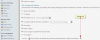
The accessible via password protected directory /plesk-stat/webstat option allows a subscriber view website statistics at URLs like https://example.com/plesk-stat/webstat using their system user account login and password.
Thanks in advance for your assistance but nothing changes
The problem is : what ever I do, system doesn't let me enter stats page.
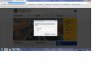
I enter username and password of the plesk here and push enter but same window opens
The solution would be to uncheck it? That's just a change, not a solution.
That means the statistics would be accessible to everyone that figures out the URL or knows Plesk. That's not something you want, or something that we can present to our customers.
Our customers can't log on to their stats with Plesk 11 (Windows), because the USER login does not work for that. But the user login does work for the panel.