
 Facebook
 Twitter
Hi everyone,
since the apcu module is deprecated in the plesk installation, is there a way to install it manually? I tried it with this one:

 support.plesk.com
The results after the manual installation is the following:
/opt/plesk/php/7.3/bin/php -i | grep apc.enabled
apc.enabled => On => On
and:
/opt/plesk/php/7.3/bin/php -m | grep apc
apcu
and:
cat /opt/plesk/php/7.3/etc/php.d/apcu.ini
extension=apcu.so
But when I check in the web interface, it's not there.
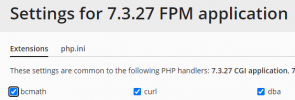
Is there any way to bring the old apcu module back?
Thanks in advance for your help!
Br,
Michael
since the apcu module is deprecated in the plesk installation, is there a way to install it manually? I tried it with this one:
How to add additional PHP module for PHP engines shipped with Plesk on Linux?
Applicable to: Plesk for Linux Question How to add additional PHP module for PHP engines shipped with Plesk on Linux? Answer Note: The resolution steps described in this article require administ...
The results after the manual installation is the following:
/opt/plesk/php/7.3/bin/php -i | grep apc.enabled
apc.enabled => On => On
and:
/opt/plesk/php/7.3/bin/php -m | grep apc
apcu
and:
cat /opt/plesk/php/7.3/etc/php.d/apcu.ini
extension=apcu.so
But when I check in the web interface, it's not there.
Is there any way to bring the old apcu module back?
Thanks in advance for your help!
Br,
Michael


