Facebook
 Twitter
- Server operating system version
- AlmaLinux 9
- Plesk version and microupdate number
- 18
I am used to using EasyApache4 for selecting, installing and removing PHP modules as required for any PHP major version.
Moving across to Plesk it appears this whole concept doesn't exist on Plesk. What can be done instead?
1. EasyApache had a list of all available modules per PHP version. What does Plesk have?
2. EasyApache had an easy select and install process for any of these modules, to either add or remove. What does Plesk have?
I have read this https://support.plesk.com/hc/en-us/...e-for-PHP-engines-shipped-with-Plesk-on-Linux which gives a qualifier this is a process Plesk does not support and which frankly, is a command line interface and requires knowledge of every single package required. If everything that's needed to be done can only be done via CLI then what's even the point of Plesk existing at all?
And Yes searching the Extensions catalog also doesn't appear to show any extensions that appear to do this sort of thing.
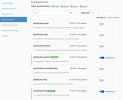
Why can't Plesk have any sort of nuance or customisation as exampled in this screenshot from EasyApache4? If it does, why is it so hidden?
Moving across to Plesk it appears this whole concept doesn't exist on Plesk. What can be done instead?
1. EasyApache had a list of all available modules per PHP version. What does Plesk have?
2. EasyApache had an easy select and install process for any of these modules, to either add or remove. What does Plesk have?
I have read this https://support.plesk.com/hc/en-us/...e-for-PHP-engines-shipped-with-Plesk-on-Linux which gives a qualifier this is a process Plesk does not support and which frankly, is a command line interface and requires knowledge of every single package required. If everything that's needed to be done can only be done via CLI then what's even the point of Plesk existing at all?
And Yes searching the Extensions catalog also doesn't appear to show any extensions that appear to do this sort of thing.
Why can't Plesk have any sort of nuance or customisation as exampled in this screenshot from EasyApache4? If it does, why is it so hidden?