
 Facebook
 Twitter
itexpertnow
New Pleskian
- Server operating system version
- Ubuntu 22.04
- Plesk version and microupdate number
- 18.0.53
Hi,
I have multiple domains on the same plesk server, I need help with 2 issues:
1. When the user send an email from their laptop outlook application, the public IP "From" will be exposed, is there a way to hide the sender IP?
As example:
2. How to configure all domains to use smtp.itexpertnow.com instead of mail.domain.com for both incoming and outgoing server?
Servername: smtp.itexpertnow.com
PTR: smtp.itexpertnow.com
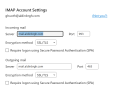
When I add the email in outlook, it automatically gets the incoming and outgoing mail server: mail.aldinbrgh.com

I have multiple domains on the same plesk server, I need help with 2 issues:
1. When the user send an email from their laptop outlook application, the public IP "From" will be exposed, is there a way to hide the sender IP?
As example:
| Hop | Delay | From | By | With | Time (UTC) | Blacklist |
|---|---|---|---|---|---|---|
| 1 | * | AlexP16 85.242.156.135 | smtp.itexpertnow.com |
2. How to configure all domains to use smtp.itexpertnow.com instead of mail.domain.com for both incoming and outgoing server?
Servername: smtp.itexpertnow.com
PTR: smtp.itexpertnow.com
When I add the email in outlook, it automatically gets the incoming and outgoing mail server: mail.aldinbrgh.com
aldinbrgh.com DNS records:

