
 Facebook
 Twitter
hardbrasil
Regular Pleskian
- Server operating system version
- Almalinux 8 latest
- Plesk version and microupdate number
- PLesk latest
Hi fellas,
i set my backup manager to store the backp files into local (Plesk server) and remote trough SFTP.
untill here everthing was fine.
when i access the backup list today i saw many erros into backup process:
Unable to create the remote backup: Transport error: Extension transport: ext://sftp-backup/server/: Failed to transfer the remote file: permission denied
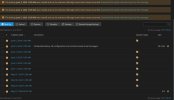
the backup file was not created.
so i adjust the folder permition, and i will wait if will works tomorow.
the point is, i choose the option to save local AND remotelly, so for a matter o logical, if remote fails the backup still need to be performed and save locally, ate least this is my expectation, make sense?
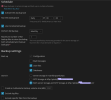
so i would like to suggest this for the Plesk team.
maintaing the backup locally even the remote fails.
thanks
i set my backup manager to store the backp files into local (Plesk server) and remote trough SFTP.
untill here everthing was fine.
when i access the backup list today i saw many erros into backup process:
Unable to create the remote backup: Transport error: Extension transport: ext://sftp-backup/server/: Failed to transfer the remote file: permission denied
the backup file was not created.
so i adjust the folder permition, and i will wait if will works tomorow.
the point is, i choose the option to save local AND remotelly, so for a matter o logical, if remote fails the backup still need to be performed and save locally, ate least this is my expectation, make sense?
so i would like to suggest this for the Plesk team.
maintaing the backup locally even the remote fails.
thanks


