
 Facebook
 Twitter
- Server operating system version
- ubuntu 22.04
- Plesk version and microupdate number
- 18.0.80 #1
Hello everybody,
i'm looking for some help to solve this problem as i'm currently out of ideas...
Thank you!
Scenario:
Plesk Obsidian 18.0.80 update 1 (Plesk Obsidian v18.0.80_build1800260804.15 os_Ubuntu 22.04)
Ubuntu 22.04.5 LTS
Remote backups settings in plesk:
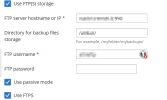
Remote FTPS server: Filezilla server 1.12.5

Remote FTPS user settings:

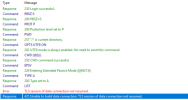
Problem: FTPS backups to external FTPS server fail with the following error:
Command issued:
Enter host password for user '[REDACTED]':
* Trying [REDACTED]:990...
* Connected to [REDACTED] (XXX.XXX.XXX.XXX) port 990 (#0)
* server response timeout
* Closing connection 0
curl: (28) server response timeout
FTP server Response:
425 Unable to build data connection: TLS session of data connection not resumed.
Investigation:
Today, before upgrading plesk to 18.0.80 update 1, FTPS backups were working and plesk was on version 18.0.79 update 5.
Updating filezilla server to 1.12.6 didn't help.
Renewing certificate didn't help.
Switching to explicit ftp didn't help.
Changing/adding parameters on panel.ini and proftpd.conf as suggested on other posts didn't help. (Ref. BUG Plesk 18.0.77 - FTP backups no longer work )
BUT
changing curl command from ftp to ftps
works and gives the correct output from ftps server.
So i think that plesk updates involve changes to Curl and ssl packages and the commands should be issued differently by plesk.
Workaround:
Disabling FTPS and switching to unsecure FTP enables remote backups again.
i'm looking for some help to solve this problem as i'm currently out of ideas...
Thank you!
Scenario:
Plesk Obsidian 18.0.80 update 1 (Plesk Obsidian v18.0.80_build1800260804.15 os_Ubuntu 22.04)
Ubuntu 22.04.5 LTS
Remote backups settings in plesk:
Remote FTPS server: Filezilla server 1.12.5
Remote FTPS user settings:
Problem: FTPS backups to external FTPS server fail with the following error:
Code:
Error: Unable to access the storage: Transport error: unable to list directory: Curl error: (56) Failure when receiving data from the peer: The last FTP request: LIST: The last FTP response: 150 Starting data transfer
Make sure you have entered the correct storage settings. You can check them independently with the command:
# curl -v --ftp-pasv --ssl -k -u [REDACTED] 'ftp://[REDACTED]:990//[REDACTED]//'
Command issued:
Code:
# curl -v --ftp-pasv --ssl -k -u [REDACTED] 'ftp://[REDACTED]:990//[REDACTED]//'* Trying [REDACTED]:990...
* Connected to [REDACTED] (XXX.XXX.XXX.XXX) port 990 (#0)
* server response timeout
* Closing connection 0
curl: (28) server response timeout
FTP server Response:
425 Unable to build data connection: TLS session of data connection not resumed.
Investigation:
Today, before upgrading plesk to 18.0.80 update 1, FTPS backups were working and plesk was on version 18.0.79 update 5.
Updating filezilla server to 1.12.6 didn't help.
Renewing certificate didn't help.
Switching to explicit ftp didn't help.
Changing/adding parameters on panel.ini and proftpd.conf as suggested on other posts didn't help. (Ref. BUG Plesk 18.0.77 - FTP backups no longer work )
BUT
changing curl command from ftp to ftps
Code:
# curl -v --ftp-pasv --ssl -k -u [REDACTED] 'ftps://[REDACTED]:990//[REDACTED]//'works and gives the correct output from ftps server.
So i think that plesk updates involve changes to Curl and ssl packages and the commands should be issued differently by plesk.
Workaround:
Disabling FTPS and switching to unsecure FTP enables remote backups again.
