• Debian 11 is approaching its end-of-life (vendor EOL date - August 31, 2026). Plesk Obsidian 18.0.80 will be the last release to support it.
    If you are running Plesk Obsidian on Debian 11, we recommend you upgrade those servers to Debian 12 using our dist-upgrade tool.
  • We plan to deprecate and remove the support for XML RPC protocol versions earlier than 1.6.9.1 in Plesk Obsidian 18.0.82. We strongly recommend that you update all existing integrations using earlier versions of the XML RPC protocol to comply with the version 1.6.9.1 specification.

Resolved backup manager interface says I have none backups

sergiomb

Basic Pleskian
Server operating system version
AlmaLinux 9.6 (Sage Margay)
Plesk version and microupdate number
Plesk Obsidian 18.0.72 Update #3, Web Pro Edition
I'm investigating an issue on my Plesk that I noticed today. I don't know how long it has been there.
I have plenty of updated backups [1], but the backup interface says I have none.

[1]
du -sh /var/lib/psa/dumps/domains/
58G /var/lib/psa/dumps/domains/
 
Hello @sergiomb
Backup of websites, created via Domains > example.com > Backup & Restore (on the right pane) are not visible in Tools & Settings > Backup manager
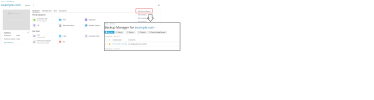
this is expected. Please clarify where located backup interface you mentioned.backup.png
 
Last edited:
Error: Only the remote storages are allowed for backups but their settings are not specified. Configure a remote storage first.
 
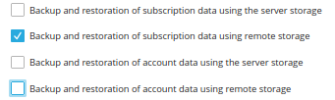
I want enable Backup and restoration of subscription data using the server storage
but I don't find it


Log into Plesk.
  1. Configure a remote (e.g. FTP) backup storage under Customer's account in Backup Manager > Remote Storage Settings. New backups will be stored in the configured remote storage.
  2. Grant the customer's subscription permission to create backups on the local server. Under Administrator account go to Subscriptions > example > Customize (on the right Account sidebar) > Permissions > Check the box Backup and restoration of subscription data using the server storage and Apply the changes.
 
Error: Only the remote storages are allowed for backups but their settings are not specified. Configure a remote storage first.
I suspect "Restricted Mode" is enabled and is restricting you from managing local backups.

You can disable "Restricted Mode" via Tools & settings > Restricted Mode or via SSH by running the plesk bin poweruser --off -simple false -lock false command.
 
Back
Top