
 Facebook
 Twitter
- Server operating system version
- alma linux 9.7
- Plesk version and microupdate number
- obsidian 18.0.76#2
Plesk Backup Manager
- We have a server-wide back up that was made last year that is hosted on a remote storage.
- The server back up is ~200Gb .
- We need to restore a single email account from a single email address from this.
- Plesk will not automatically find the file in the remote storage.
- So we download the .tar backup file to the local disk.
- Now, Plesk will only allow ~2Gb upload via the GUI which is fine, the email account size in the downloaded .tar is 77.8Mb .
We have extracted the tzst file from within the backup and tried uploading it to the Plesk subscription Backup Manager. Plesk said:
We have also then extracted the existing container and existing XML files from the external Tar and resaved in a new Tar containing the existing data in its current shape / tree :
This is 108Mb .
We upload this to Plesk;
Plesk says:
File shape:
Theses are all structurally the same place as on the original .Tar server wide backup.
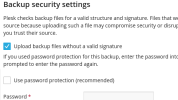
All uploads are done via ticking the "unsafe" box and not ticking the encryption box as all file values are plaintext in source.
Also have viewed the https://support.plesk.com/hc/en-us/...r-xml-zip-backup-file-to-Plesk-Backup-Manager help but this is completely unhelpful.
How do we upload Tar files to Plesk Backup so the backup recognises them?
- We have a server-wide back up that was made last year that is hosted on a remote storage.
- The server back up is ~200Gb .
- We need to restore a single email account from a single email address from this.
- Plesk will not automatically find the file in the remote storage.
- So we download the .tar backup file to the local disk.
- Now, Plesk will only allow ~2Gb upload via the GUI which is fine, the email account size in the downloaded .tar is 77.8Mb .
We have extracted the tzst file from within the backup and tried uploading it to the Plesk subscription Backup Manager. Plesk said:
Error: Unable to upload railwayBackup.tar to the server storage: Unable to import file as dump: Import error: Unable to find the archive metadata. The archive is not a valid Plesk backup or has been created in an unsupported Plesk version
We have also then extracted the existing container and existing XML files from the external Tar and resaved in a new Tar containing the existing data in its current shape / tree :
This is 108Mb .
We upload this to Plesk;
Plesk says:
Error: Unable to upload railwayBackup.tar to the server storage: Unable to import file as dump: Import error: Unable to find the archive metadata. The archive is not a valid Plesk backup or has been created in an unsupported Plesk version
File shape:
Code:
railwayBackup.tar
==============
   \---> backup_info_2511262310.xml
   \---> domains [folder]
       \--->domainname.org.uk [folder]
           \---> backup_ * _.tzst (various files)
           \---> backup_info_2511262310.xml
Theses are all structurally the same place as on the original .Tar server wide backup.
All uploads are done via ticking the "unsafe" box and not ticking the encryption box as all file values are plaintext in source.
Also have viewed the https://support.plesk.com/hc/en-us/...r-xml-zip-backup-file-to-Plesk-Backup-Manager help but this is completely unhelpful.
How do we upload Tar files to Plesk Backup so the backup recognises them?


