• Halloween is coming! To celebrate the occasion, we dusted off a couple of old skins, and even created a brand new one (Pixel).
    To get into the festive spirit, install the Skins extension.
  • The new Python extension is now available. It allows customers to deploy and manage WSGI-based Python applications on their websites directly from Plesk.
  • The Plesk Mobile apps for iOS and Android and the Plesk Mobile Center extension have been deprecated, and are no longer available for new installations. In Plesk Obsidian 18.0.84, the Plesk Mobile Center extension will be removed from servers during the upgrade, and the Plesk Mobile apps will lose their server management features.
  • The Social Login extension has been deprecated and will be removed in Plesk Obsidian 18.0.84. After that, it will no longer be possible to log in to Plesk with a Google, Facebook, GitHub account, or with a passkey. Plesk usernames and passwords, as well as logging in with a WebPros Account, are not affected.

Question Backups deleted after one month, can't find the setting

carlsson

Regular Pleskian
Server operating system version
Ubuntu 20.04.6 LTS
Plesk version and microupdate number
18.0.75
I was about to restore a backup from Christmas, but in Backup Manager my oldest backup is from the 12th of January!
So, something deletes my backups after one month. :-/

  • I back up the files to our Dropbox account, where I have 1.5 TB free, so it's not a space issue.
  • I can't find any settings for "deletion after x amount of time", ie retention policy.
  • I have "Maximum number of full backup files to store" set to 15, but there are only 5 full backups available.

What have I missed? o_O
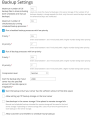
 
  1. Tools & Settings > Backup Manager > Settings > Maximum number of full backup files to store (including both scheduled and manual backups)
  2. Tools & Settings > Backup Manager > Scheduled Backups > Maximum number of full backup files to store (including both scheduled and manual backups)
 
Thanks, but as far as I can tell it's set up ok.
Since the backups are exactly one month old I think there's a hidden setting I've missed somewhere.

1770829360352.png
1770829557808.png
 
…and today I cannot reach the backup from the 12th of January any more...

Is there any way to see *why* this happens? I have looked for logs in Backup Manager but can't find it.


1770909366280.png
 
Are you using a Dropbox Basic, Plus, or Family plan? If so they only support 30 days of retention total. The way the Dropbox Backup extension works is it utilizes the revision history (why when you set up the Dropbox backup feature it asks what filename to use). It basically ignores the settings from Plesk.

If you want longer retention for the version history you'll need to upgrade your Dropbox account to a Pro, Essentials, Business or Standard for 180 days or Business Plus, Advanced, or Enterprise for 365 days.
Ah, yes, I should have known that.
 
Last edited:
Back
Top