• We value your experience with Plesk during 2025
    Plesk strives to perform even better in 2026. To help us improve further, please answer a few questions about your experience with Plesk Obsidian 2025.
    Please take this short survey:

    https://survey.webpros.com/
  • On Plesk for Linux mod_status is disabled on upgrades to improve Apache security.
    This is a one-time operation that occurs during an upgrade. You can manually enable mod_status later if needed.

Question Best way of handling spam email blocking / removal via spamscore?

MHC_1

Regular Pleskian
Server operating system version
AlmaLinux 9.7
Plesk version and microupdate number
Obsidian 18.0.75
Hello
We have various email accounts on the Plesk server. Some of these have had recent spikes in email sent to specific addresses.

The email on the server is currently not too bad, the majority of the spam is caught (by blacklists) and server wide settings.

BUT, on other servers and in other places we have had a dual setting for spam detection scoring and behaviour. That spam above an X score is marked as spam and then spam above a Y score is deleted as assumed positive spam. This is great for highlighting probable but not certain spam to end users but preserving false positives.

Eg:
Spam score = 6 = Mark as **SPAM**
Spam score 3.5 DELETE this email as spam.

How can we replicate this behaviour at any level (server wide / account wide / mailbox specific) on the Plesk server?


PS I had always understood this score was SpamAssassin generated but spamAssassin is not running on the server it's replaced by the Plesk Email Security Extension which to be honest doesn't seem to do a whole lot at all (maybe it's only good for outgoing rather than incoming?).
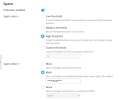
 

Attachments

  • Screenshot from 2026-02-10 13-04-15.png
    Screenshot from 2026-02-10 13-04-15.png
    54.6 KB · Views: 2
Further to the above; If the Plesk Email Security Server wide settings have Spam score of - example - "4" to be Marked **SPAM** and then the account specific Plesk Email Security has a setting of Spam score of - example - "7" to be deleted, will both these rules be applied to an account email address? EG

Score > 7 = <deleted>
Score > 4 = **SPAM**
 
Further to the above; If the Plesk Email Security Server wide settings have Spam score of - example - "4" to be Marked **SPAM** and then the account specific Plesk Email Security has a setting of Spam score of - example - "7" to be deleted, will both these rules be applied to an account email address?
No. Currently Plesk, including the PES extension, only supports a single action to be performed on recognized spam messages. The action you set on the settings of the email account will overwrite the server wide setting.

However, if you don't mind customizing your server setup and getting yourself familiar with Dovecot, you can probably manually achieve this by adding a custom Dovecot configuration with a Sieve filter. With the Sieve filter you can for example delete messages with a high spam score. You can apply it system wide or just to one email account.

Roundcube for uses Sieve as the default filter component too. So you can create a basic Sieve filter when you're logged into Roundcube. Which might be an easier route than to customize the Dovecot configration. Obviously the filter rules you create only apply to that particular email account. I am not sure which filter rules are best suited for this, you'll have to fiddle around a bit to find out yourself.

PS I had always understood this score was SpamAssassin generated but spamAssassin is not running on the server it's replaced by the Plesk Email Security Extension which to be honest doesn't seem to do a whole lot at all (maybe it's only good for outgoing rather than incoming?).
The PES extension also utilizes SpamAssassin, just with Amavis for a more efficient and flexible integration into the mail stack. SpamAssassin still does the spam filtering and is configured to run slightly different with the PES extension in comparison to the vanilla SpamAssassin component you can install with Plesk. But it does not make much of a difference in recognizing/catching spam in my experience.

If you're feeling up to it there are many ways to manually customize your SpamAssassin configuration to improve its's effectiveness. There are multiple threads on this forum on this subject, and if you Google around you'll probably find plenty too. If you don't feel like customizing your SpamAssassin configuration manually (which I can totally understand), I can recommend the Warden Anti-Spam extension. It's a paid extension, but comes with many advanced features for spam filtering. Not sure if the extension also allows for dual action on spam messages, but @danami seems to be open for new features requests, if they are feasible.
 
Back
Top