Facebook
 Twitter
itexpertnow
New Pleskian
- Server operating system version
- Ubuntu 22.04
- Plesk version and microupdate number
- 18.0.53
Hi,
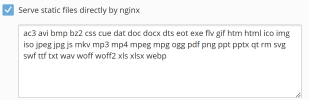
how to block access to sensitive files i nthis location?
/var/www/vhosts/domain.com/httpdocs/wp-content/updraft/
I tried this nginx config but it didn't work:
Home > Domains > Apache & nginx Settings > Additional nginx directives
#Deny access to wp-content folders for suspicious files
location ~* "^(?:/)wp-content/updraft/.*\.(zip|gz|tar|bzip2|7z)" { deny all; }
however it worked when I edited this file directly: /etc/nginx/plesk.conf.d/vhosts/domain.com.conf but I don't want to do that due to this notice:
#ATTENTION!
#
#DO NOT MODIFY THIS FILE BECAUSE IT WAS GENERATED AUTOMATICALLY,
#SO ALL YOUR CHANGES WILL BE LOST THE NEXT TIME THE FILE IS GENERATED.
how to block access to sensitive files i nthis location?
/var/www/vhosts/domain.com/httpdocs/wp-content/updraft/
I tried this nginx config but it didn't work:
Home > Domains > Apache & nginx Settings > Additional nginx directives
#Deny access to wp-content folders for suspicious files
location ~* "^(?:/)wp-content/updraft/.*\.(zip|gz|tar|bzip2|7z)" { deny all; }
however it worked when I edited this file directly: /etc/nginx/plesk.conf.d/vhosts/domain.com.conf but I don't want to do that due to this notice:
#ATTENTION!
#
#DO NOT MODIFY THIS FILE BECAUSE IT WAS GENERATED AUTOMATICALLY,
#SO ALL YOUR CHANGES WILL BE LOST THE NEXT TIME THE FILE IS GENERATED.