
 Facebook
 Twitter
thinkjarvis
Basic Pleskian
- Server operating system version
- Ubuntu 24.04.4 LTS
- Plesk version and microupdate number
- Plesk Obsidian 18.0.78 Update #4
Bug overview:
We have discovered that Plesk is stripping off the X-Acccel and Xsendfile headers added by woocommerce for faster secure downloadable products.
This means the woocommerce_uploads folder cannot be restricted using the recommended Nginx settings - Meaning downloads can be stolen.
This applies to all Woocommerce sites running on plesk with an apach proxy to nginx.
On sites with large downloadable products this causes the CPU to get tied up serving downloads.
More details:
This site has downloadable products as big as 4gb. But this applies to all Woocommerce sites running on plesk with an apach proxy to nginx.
We have had to increase the CPU cores substantially to deal with download spikes.
We have the following Additional Apache directives
XSendFile On
XSendFilePath /var/www/vhosts/domain.com/httpdocs/wp-content/uploads/woocommerce_uploads
Nginx:

This issue came about when setting the following in Woocommerce:
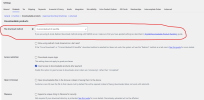
Woocommerce Nginx setting guidance:

 developer.woocommerce.com
Because the x_accel headers are not applying - The woocommerce_uploads folder can be accessed directly - Meaning downloads can be stolen for free.
Security work around
Insert this snippet instead: Which stops Nginx serving the folder directly
Nginx serving files over X_accel fix?
Please can I ask if the community have any suggestions and solutions?
We have discovered that Plesk is stripping off the X-Acccel and Xsendfile headers added by woocommerce for faster secure downloadable products.
This means the woocommerce_uploads folder cannot be restricted using the recommended Nginx settings - Meaning downloads can be stolen.
This applies to all Woocommerce sites running on plesk with an apach proxy to nginx.
On sites with large downloadable products this causes the CPU to get tied up serving downloads.
More details:
This site has downloadable products as big as 4gb. But this applies to all Woocommerce sites running on plesk with an apach proxy to nginx.
We have had to increase the CPU cores substantially to deal with download spikes.
We have the following Additional Apache directives
XSendFile On
XSendFilePath /var/www/vhosts/domain.com/httpdocs/wp-content/uploads/woocommerce_uploads
Nginx:
This issue came about when setting the following in Woocommerce:
Woocommerce Nginx setting guidance:
Using NGINX server to protect your upload directory | WooCommerce developer docs
If you using NGINX server for your site along with X-Accel-Redirect/X-Sendfile or Force Downloads download method, it is necessary that you add this configuration for better security:
developer.woocommerce.com
Code:
# Protect WooCommerce upload folder from being accessed directly.
# You may want to change this config if you are using "X-Accel-Redirect/X-Sendfile" or "Force Downloads" method for downloadable products.
# Place this config towards the end of "server" block in NGINX configuration.
location ~* /wp-content/uploads/woocommerce_uploads/ {
    if ( $upstream_http_x_accel_redirect = "" ) {
        return 403;
    }
    internal;
}
Because the x_accel headers are not applying - The woocommerce_uploads folder can be accessed directly - Meaning downloads can be stolen for free.
Security work around
Insert this snippet instead: Which stops Nginx serving the folder directly
Code:
location ^~ /wp-content/uploads/woocommerce_uploads/ {

return 403;

}
Nginx serving files over X_accel fix?
Please can I ask if the community have any suggestions and solutions?
