
 Facebook
 Twitter
hellokevin11
New Pleskian
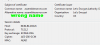
Someone misconfigured letsencrypt with the wrong server base name. I see no option to change it at all in plesk letsencrypt, all I can do is make new domain certificates, but they all have the incorrect base server name.
It's causing browsers to show warnings about security.
I want to remove letsencrypt, and reinstall and hopefully fix the problem, or if someone knows how to change it in plesk or CLI?
Many thanks.
It's causing browsers to show warnings about security.
I want to remove letsencrypt, and reinstall and hopefully fix the problem, or if someone knows how to change it in plesk or CLI?
Many thanks.


